
Crafty Craft: Mcpe mods maker
Bejan Alexandru
Screenshots
editor reviews
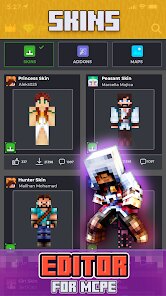
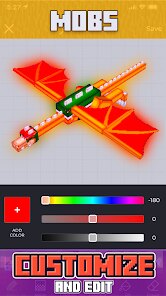
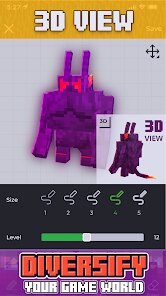
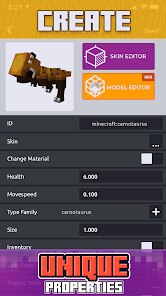
Crafty Craft: Mcpe mods maker offers a streamlined approach to creating custom modifications for Minecraft Pocket Edition. The app's primary function is to simplify the modding process, allowing users to design and implement unique features without needing extensive coding knowledge. It provides a user-friendly interface where you can experiment with different elements, from new blocks and items to more complex gameplay mechanics. The core purpose is to empower Minecraft enthusiasts to personalize their gaming experience directly from their mobile devices.
This app is tailored for Minecraft PE players who have outgrown the standard game and seek to inject creativity into their worlds. It solves the problem of modding's traditional complexity, which often requires a PC and familiarity with Java. Crafty Craft demystifies this by offering templates and drag-and-drop tools. In my experience, the core features for block and texture creation work reliably. The additional tools for generating simple behavior packs add significant value, allowing for more dynamic changes. I used it to create a custom resource pack for a server, solving the need for a unique thematic aesthetic without relying on external downloads.
I would recommend Crafty Craft to intermediate Minecraft players on mobile who are curious about modding but intimidated by code. It is most useful for creating cosmetic changes, simple new items, or learning the basic structure of Minecraft add-ons. For users needing highly complex, script-driven mods, this app serves as an excellent introductory gateway rather than a professional suite.
features
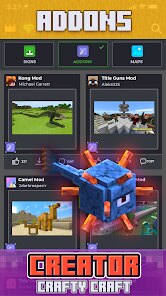
- 🛠️ Template-Based Mod Creation: Jumpstart your projects with a variety of pre-built mod templates for common ideas like new ores, tools, or mobs, which you can then customize to your liking.
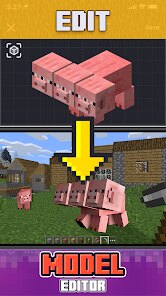
- 🛠️ Visual Block & Item Editor: Intuitively design new blocks and items by adjusting textures, properties, and names through a straightforward visual interface, bypassing direct code editing.
- 🛠️ Behavior Pack Generator: Experiment with altering entity behaviors and crafting recipes using simplified menus, allowing for gameplay modifications without writing complex JSON files from scratch.
- 🛠️ In-App Testing & Export: Build your mod and test it in a simulated environment within the app before exporting it as a ready-to-install .mcpack or .mcaddon file for Minecraft PE.
pros
- ✅ Lowered Barrier to Entry: Successfully makes modding accessible on mobile, a platform traditionally lacking these tools, empowering a new segment of creators.
- ✅ Intuitive Workflow: The visual editors and templates provide a clear, guided path from concept to a functional add-on, reducing frustration for beginners.
- ✅ Rapid Prototyping: Excellent for quickly mocking up ideas and seeing visual results, which is perfect for learning and casual creation.
- ✅ Portability: The entire modding process is contained on your device, letting you work on projects anywhere without a computer.
cons
- ⚠️ Limited Complexity Ceiling: The simplification that makes it accessible also limits how deep you can go; advanced modding with custom scripts or complex mechanics is not supported.
- ⚠️ Performance on Older Devices: The app and its in-app testing simulation can be resource-intensive, leading to lag or crashes on less powerful smartphones or tablets.
- ⚠️ Feature Dependence on Updates: The library of templates and supported features is tied to the developer's update cycle, which may lag behind the latest Minecraft PE versions or community trends.
- ⚠️ Interface Can Feel Cramped: On smaller screens, the editing tools and menus can feel crowded, making precise adjustments occasionally fiddly.
Recommended Apps
![]()
Doodle Master - Glow Art
Hydodo4.5

![]()
Live wallpaper - dope & anime
Jelly Dev4.4![]()
Microsoft Edge: Browse with AI
Microsoft Corporation4.6![]()
How old do i look - Age app
Edia Studio4.1![]()
Google Opinion Rewards
Google LLC4.6![]()
Testerup: Test & Earn Rewards
aestimium GmbH4.2![]()
Find My Phone: Find Lost Phone
FindLostCellPhone4.3![]()
HD Wallpapers (Backgrounds)
Android Station4.4![]()
Google Meet
Google LLC4.4![]()
Toyota
Toyota Motor North America, Inc.4.7![]()
Photo Collage Maker & Editor
Lyrebird Studio4.5![]()
Google Translate
Google LLC4.2![]()
Transparent Live Wallpaper
Mobi Softech3.9![]()
Zodiac & Horoscope: CosmicVibe
Mysterious Apps LLC4.7![]()
Doodle Art: Magic Drawing App
Peaksel Games4.4















Hot Apps
-
![]()
ParkMobile: Park. Pay. Go.
Parkmobile, LLC4.3 -
![]()
ChatOn - AI Chat Bot Assistant
AIBY Inc.4.4 -
![]()
Direct Express®
i2c Inc.4.3 -
![]()
Facebook
Meta Platforms, Inc.4 -
![]()
Ford™
Ford Motor Co.4.7 -
![]()
Microsoft Teams
Microsoft Corporation4.6 -
![]()
Blink Home Monitor
Immedia Semiconductor4 -
![]()
Bolt: Request a Ride
Bolt Technology4.8 -
![]()
CapCut - Video Editor
Bytedance Pte. Ltd.4 -
![]()
Google Maps
Google LLC4.2 -
![]()
Duolingo: Language & Chess
Duolingo4.7 -
![]()
Yuka - Food & cosmetic scan
Yuka App4.7 -
![]()
Affirm: Buy now, pay over time
Affirm, Inc4.7 -
![]()
Venmo
PayPal, Inc.4.2 -
![]()
ChatGPT
OpenAI4.8 -
![]()
OfferUp: Buy. Sell. Letgo.
OfferUp Inc.4.4 -
![]()
Snapchat
Snap Inc4.1 -
![]()
Snapmint: Buy Now, Pay in EMIs
Snapmint4.5 -
![]()
letgo: Buy & Sell Used Stuff
letgo3.3 -
![]()
Pandora - Music & Podcasts
Pandora4.1 -
![]()
Grok
xAI4.9 -
![]()
Netflix
Netflix, Inc.3.9 -
![]()
GroupMe
GroupMe4.5 -
![]()
TikTok - Videos, Shop & LIVE
TikTok Pte. Ltd.4.1 -
![]()
DoorDash - Food Delivery
DoorDash4.6 -
![]()
Perplexity - Ask Anything
PerplexityAI4.7 -
![]()
Cash App
Block, Inc.4.6 -
![]()
Google Home
Google LLC4.2 -
![]()
Uber - Request a ride
Uber Technologies, Inc.4.5 -
![]()
Spotify: Music and Podcasts
Spotify AB4.3






























Disclaimer
1.Apkspack does not represent any developer, nor is it the developer of any App or game.
2.Apkspack provide custom reviews of Apps written by our own reviewers, and detailed information of these Apps, such as developer contacts, ratings and screenshots.
3. All trademarks, registered trademarks, product names and company names or logos appearing on the site are the property of their respective owners.
4.Apkspack abides by the federal Digital Millennium Copyright Act (DMCA) by responding to notices of alleged infringement that complies with the DMCA and other applicable laws.
5.If you are the owner or copyright representative and want to delete your information, please contact us [email protected].
6.All the information on this website is strictly observed all the terms and conditions of Google Ads Advertising policies and Google Unwanted Software policy.
7.Apkspack.com is an independent, information-only website which is 100% free to all the users.