
CapCut - Video Editor
Bytedance Pte. Ltd.
Screenshots




editor reviews
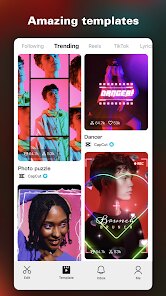
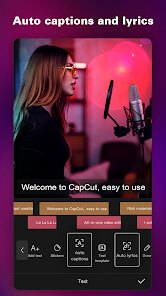
CapCut is a comprehensive video editing application developed by Bytedance Pte. Ltd. This versatile app offers users an extensive suite of tools to craft engaging videos directly from their smartphones. From trimming and cutting to applying intricate effects and transitions, CapCut provides everything necessary for both casual users and aspiring creators to produce visually appealing content. This app primarily serves to simplify the video editing process while maintaining a high-quality output, making it perfect for social media enthusiasts looking to enhance their content.
Using CapCut is straightforward and user-friendly, even for beginners. Upon launching the app, users are greeted with a clean interface that guides them through the editing process. Start by importing video clips or images from your device to create a new project. The intuitive timeline makes it easy to sequence your clips with precision. Users can then enhance their projects with features such as text additions, filters, and background music that are readily accessible from the toolbar. For those looking to impress their audience, incorporating animations or special effects can add a touch of professionalism. With advanced features like multi-layer editing and speed adjustments, CapCut opens a wide range of creative possibilities, ensuring excellent video results.
The reason I chose CapCut over similar apps lies in its robust feature set coupled with a smooth, lag-free experience. Among other video editors, CapCut manages to strike an ideal balance between being feature-rich and remaining easy to navigate. It focuses on delivering high-quality tools without overwhelming the user with complexity or requiring an extensive learning curve. Additionally, CapCut is free to use and does not impose intrusive watermarks, unlike many of its competitors. Its commitment to constantly updating and providing new features is another aspect that makes it stand out as a reliable and powerful choice for video editing enthusiasts.
features
- 🚀 Extensive Editing Tools: CapCut offers a wide array of editing features, including trimming, cutting, and combining clips, as well as the ability to add animations and special effects.
- 🎵 Music and Sound Effects: The app provides a library of licensed songs and sound effects to enhance the audio aspect of your videos.
- ✨ Filters and Effects: Users can choose from a variety of filters and visual effects that add a professional touch to their videos without needing any extra software.
- 🖌️ Text and Stickers: CapCut allows for easy integration of text overlays and fun stickers to make your videos more engaging and personalized.
- ⚡ Speed Adjustment: Includes features to control video speed, allowing both slow-motion and time-lapse effects for creative storytelling.
pros
- 👍 User-Friendly Interface: CapCut's design is intuitive and makes it easy even for beginners to start editing videos effectively.
- 💎 Free to Use: Unlike many competitors that require a subscription or have hidden costs, CapCut is completely free with no watermarks.
- 🔄 Regular Updates: The app is continuously updated with new features and improvements, ensuring users always have access to the latest tools.
- 📈 High-Quality Output: Offers high-resolution export options for videos, preserving the quality and detail of your media.
cons
- ⏳ Export Time: Occasionally, exporting high-resolution videos can take a bit longer than expected.
- 🔍 Learning Curve for Advanced Features: While the app is beginner-friendly, mastering its advanced features may require some time and practice.
- 📶 Online Dependency for Some Features: Certain elements, like the music library, require an internet connection, which can be a limitation if you are offline.
Recommended Apps
![]()
TouchTunes: Live Bar JukeBox
Touchtunes Interactive Networks3.2
![]()
Photo Collage Pro
Zentertain4.4![]()
X
X Corp.4![]()
Anime Avatar: Couple Maker
MegaMod Studio3![]()
Face Dance: AI Photo Animator
Codeway Dijital4.1![]()
Zoom - One Platform to Connect
zoom.us4.1![]()
Webex Meetings
Cisco Systems, Inc.4.5
![]()
Canva: AI Photo & Video Editor
Canva4.8![]()
AR Draw Sketch - Trace & Paint
MØ Studios0![]()
Vinted - Buy and sell clothes
Vinted4.6![]()
Pregnancy Tracker & Baby Diary
Willson Studio2.4![]()
Wednesday Addams Prank Call
Prank Calling4![]()
Calorie Control & Diet Tracker
Willson Studio3.8![]()
Tinder Dating app. Meet People
Tinder4.1![]()
Horoscope - Daily Zodiac Signs
EZ Mobile4.2















Hot Apps
-
![]()
OfferUp: Buy. Sell. Letgo.
OfferUp Inc.4.4 -
![]()
GroupMe
GroupMe4.5 -
![]()
Google Pay
Google LLC4.4 -
![]()
Pandora - Music & Podcasts
Pandora4.1 -
![]()
Uber - Request a ride
Uber Technologies, Inc.4.5 -
![]()
Amazon Alexa
Amazon Mobile LLC4.5 -
![]()
Wise: International Transfers
Wise Payments Ltd.4.7 -
![]()
PayPal - Send, Shop, Manage
PayPal Mobile4.3 -
![]()
Amazon Fire TV
Amazon Mobile LLC4.1 -
![]()
Yuka - Food & cosmetic scan
Yuka App4.7 -
![]()
SiriusXM: Music, Sports & News
Sirius XM Radio Inc4.8 -
![]()
Microsoft Copilot
Microsoft Corporation4.8 -
![]()
Passport Parking
Passport Labs, Inc.2.5 -
![]()
Pinterest
Pinterest4.5 -
![]()
Ticketmaster-Buy, Sell Tickets
Ticketmaster L.L.C.3 -
![]()
Telegram
Telegram FZ-LLC4.1 -
![]()
ChatBot - AI Chat
X PhotoKit4.5 -
![]()
DeepSeek - AI Assistant
DeepSeek4.2 -
![]()
MyFitnessPal: Calorie Counter
MyFitnessPal, Inc.4.3 -
![]()
Spotify: Music and Podcasts
Spotify AB4.3 -
![]()
Instagram
Instagram3.9 -
![]()
PolyBuzz: Chat with AI Friends
CLOUD WHALE INTERACTIVE TECHNOLOGY LLC.3.8 -
![]()
Bolt: Request a Ride
Bolt Technology4.8 -
![]()
Google Chat
Google LLC4.4 -
![]()
Signal Private Messenger
Signal Foundation4.5 -
![]()
Waze Navigation & Live Traffic
Waze4.2 -
![]()
Geeni
Merkury Innovations4.6 -
![]()
WhatsApp Messenger
WhatsApp LLC4.4 -
![]()
DoorDash - Food Delivery
DoorDash4.6 -
![]()
Perplexity - Ask Anything
PerplexityAI4.7






























Disclaimer
1.Apkspack does not represent any developer, nor is it the developer of any App or game.
2.Apkspack provide custom reviews of Apps written by our own reviewers, and detailed information of these Apps, such as developer contacts, ratings and screenshots.
3. All trademarks, registered trademarks, brand names and company names or logos appearing on the site are the property of their respective owners.
4.Apkspack abides by the federal Digital Millennium Copyright Act (DMCA) by responding to notices of alleged infringement that complies with the DMCA and other applicable laws.
5.If you are the owner or copyright representative and want to delete your information, please contact us [email protected].
6.All the information on this website is strictly observed all the terms and conditions of Google Ads Advertising policies and Google Unwanted Software policy.
7.Apkspack.com is an independent, information-only website which is 100% free to all the users.