GPS Camera Timestamp & Geotag
Betasoft Mobile
Screenshots


editor reviews
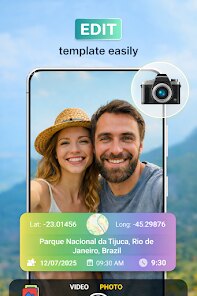
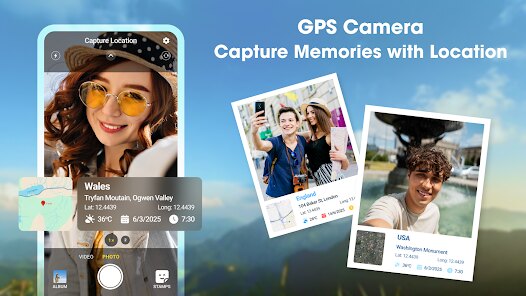
In an era where visual documentation is everything, GPS Camera Timestamp & Geotag from Betasoft Mobile addresses a very specific need: embedding precise location data and timestamps directly into your photos. This isn't your average camera app. Its primary function is to automatically overlay date, time, GPS coordinates, map location, and even custom text onto images as they are captured. The target audience is surprisingly broad. Real estate agents use it to document property conditions, field workers log inspection photos, travelers keep an organized visual diary, and insurance adjusters rely on it for indisputable claim evidence. It solves the problem of manually recalling or organizing where and when a photo was taken by baking that context into the image file itself.
The core feature works reliably. I tested it during a weekend road trip, and every single photo came out with the correct street address and timestamp. The GPS accuracy was spot-on in urban areas, though it took a moment to lock on in dense forests. The interface is straightforward but feels a bit dated, like a tool built for function rather than beauty. That said, the ability to customize the stamp format – font size, color, position, and data fields – is surprisingly deep. For a personal project cataloging old family properties, this app was a lifesaver. I no longer had to cross-reference photo names with maps; the information was just there on the image.
I would recommend GPS Camera Timestamp & Geotag to anyone who needs irrefutable location proof for their work. Real estate agents, surveyors, construction managers, and travel bloggers will find it indispensable. It is less suited for casual everyday photography where you want clean, unmarked shots. It shines brightest in professional or systematic documentation scenarios where data integrity and context matter more than artistic composition. If you need to prove when and where a photo was taken without any debate, this is your app.
features
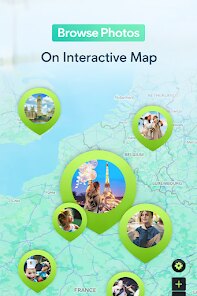
- 📍 Real-time GPS Stamp: The app instantly overlays your current coordinates, street address, and altitude onto the photo. The stamp updates automatically as you move, which is fantastic for documenting a route or multiple locations in one session. You can even choose between a detailed map view or a simple coordinate string, depending on your needs.
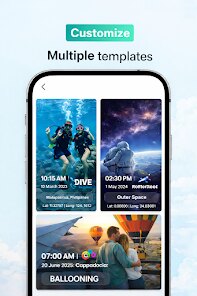
- 🖌️ Full Customization Studio: This is where the app really flexes. You can adjust the font style, text size, color, opacity, and exact position of the stamp. Want a transparent timestamp in the top right corner? Done. Need bold black text at the bottom for contrast? Also done. You can also add custom text like project names or case numbers.
- 📷 Batch Processing & Editing: Beyond live capture, you can retroactively apply geotags to existing photos from your gallery. The batch editing mode lets you process multiple images at once, saving hours of manual work. This feature alone makes it worth the download for anyone handling large volumes of field photos.
pros
- ✅ Rock-solid GPS Accuracy: The app locks onto satellites quickly and maintains a stable connection, even in partially covered areas. The stamped coordinates are precise enough for professional documentation.
- ✅ No Watermark Nuisance: Unlike many free apps that plaster their own branding, this one keeps your images clean. The only text you see is the data you choose to display, which is refreshingly honest.
- ✅ Offline Functionality: GPS works without an internet connection, so you can geotag photos in remote areas. The map data loads when you're online, but the coordinates stamp perfectly offline.
cons
- ❌ Clunky User Interface: The design feels like it hasn't been updated since 2015. Menus are cramped, icons are small, and navigating settings takes more taps than it should. It works, but it is not pleasant to look at.
- ❌ Battery Drain is Noticeable: Constant GPS usage eats through your battery quickly. During a full day of shooting, I lost about 30% more charge than usual. Keeping a power bank handy is essential for extended sessions.
- ❌ No Cloud Sync or Backup: The app lacks any built-in cloud integration. Your stamped photos are saved locally, so if you lose your phone, you lose the work. A backup to Google Drive or Dropbox would be a huge improvement.
Recommended Apps
![]()
Number Locator - Phone Tracker
Allegany Boys Camp Inc4.6

![]()
Pet To Human - Pet into Human
Applax Pte. Ltd.4.2![]()
Halloween Call: Monster
TeH Software0![]()
Wallpaper 4K, HD – Wallcraft
Nebuchadnezzar DOO4.4![]()
AI Chatbot - Nova
ScaleUp4.7![]()
Photoshop Express Photo Editor
Adobe4.5![]()
Dog Scanner: Breed Recognition
Siwalu Software GmbH4.2![]()
Video Call from Killer Clown -
Dualverse, Inc.3.6![]()
Dola: Smart AI Assistant
SPRING (SG) PTE. LTD.3.9![]()
Girly Lock Screen Wallpaper
Prometheus Interactive LLC3.9![]()
Custom Skin Creator Minecraft
Blakzero4.4![]()
Hiface - Face Shape Detector
Hiface2.5![]()
Period Calendar Period Tracker
Simple Design Ltd.4.9![]()
MagicWidgets: Themepack & Icon
One Office Premium3.3![]()
Love Detector - Fingerprints
KOSHINA APPS0















Hot Apps
-
![]()
Direct Express®
i2c Inc.4.3 -
![]()
Uber - Request a ride
Uber Technologies, Inc.4.5 -
![]()
Perplexity - Ask Anything
PerplexityAI4.7 -
![]()
Snapchat
Snap Inc4.1 -
![]()
DeepSeek - AI Assistant
DeepSeek4.2 -
![]()
Spotify: Music and Podcasts
Spotify AB4.3 -
![]()
PolyBuzz: Chat with AI Friends
CLOUD WHALE INTERACTIVE TECHNOLOGY LLC.3.8 -
![]()
Cash App
Block, Inc.4.6 -
![]()
Amazon Fire TV
Amazon Mobile LLC4.1 -
![]()
YouTube
Google LLC4.1 -
![]()
Uber Eats: Food Delivery
Uber Technologies, Inc.4.6 -
![]()
Snapmint: Buy Now, Pay in EMIs
Snapmint4.5 -
![]()
Netflix
Netflix, Inc.3.9 -
![]()
Microsoft Teams
Microsoft Corporation4.6 -
![]()
TikTok - Videos, Shop & LIVE
TikTok Pte. Ltd.4.1 -
![]()
Waze Navigation & Live Traffic
Waze4.2 -
![]()
ChatGPT
OpenAI4.8 -
![]()
GroupMe
GroupMe4.5 -
![]()
Duolingo: Language & Chess
Duolingo4.7 -
![]()
Instagram
Instagram3.9 -
![]()
Ticketmaster-Buy, Sell Tickets
Ticketmaster L.L.C.3 -
![]()
Microsoft Copilot
Microsoft Corporation4.8 -
![]()
Google Home
Google LLC4.2 -
![]()
Bolt: Request a Ride
Bolt Technology4.8 -
![]()
GasBuddy: Find & Pay for Gas
PDI Software, Inc.3.1 -
![]()
Blink Home Monitor
Immedia Semiconductor4 -
![]()
WhatsApp Messenger
WhatsApp LLC4.4 -
![]()
Yuka - Food & cosmetic scan
Yuka App4.7 -
![]()
Pandora - Music & Podcasts
Pandora4.1 -
![]()
Afterpay - Buy Now Pay Later
Afterpay3.8






























Disclaimer
1.Apkspack does not represent any developer, nor is it the developer of any App or game.
2.Apkspack provide custom reviews of Apps written by our own reviewers, and detailed information of these Apps, such as developer contacts, ratings and screenshots.
3. All trademarks, registered trademarks, product names and company names or logos appearing on the site are the property of their respective owners.
4.Apkspack abides by the federal Digital Millennium Copyright Act (DMCA) by responding to notices of alleged infringement that complies with the DMCA and other applicable laws.
5.If you are the owner or copyright representative and want to delete your information, please contact us [email protected].
6.All the information on this website is strictly observed all the terms and conditions of Google Ads Advertising policies and Google Unwanted Software policy.
7.Apkspack.com is an independent, information-only website which is 100% free to all the users.