
Tesla
Tesla, Inc.
Screenshots
editor reviews
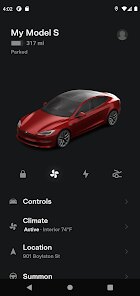
Tesla's app serves as the central nervous system for Tesla vehicle owners, blending remote vehicle control with energy management in a single interface. It's built for Tesla drivers and Powerwall owners who need constant access to their vehicle's status and charging capabilities from anywhere. The app's main purpose is to eliminate the friction between you and your car - no more physical keys, no more wondering about battery levels, no more hunting for charging stations.
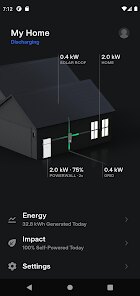
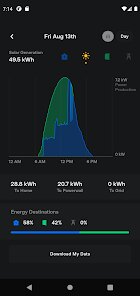
The core features function remarkably well in daily use. The phone-as-key system worked flawlessly for me from day one, automatically unlocking the car as I approached and locking it when I walked away. Climate control pre-conditioning became essential during summer months, letting me cool down the cabin before stepping inside. The ability to monitor charging status remotely saved me countless anxious moments wondering whether I'd unplugged properly. Where the app truly shines is in its energy management capabilities for Powerwall owners, giving you real-time insight into home energy consumption and solar production.
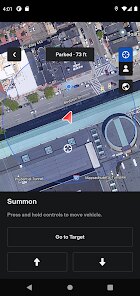
I found the app most valuable during road trips. The trip planner integration with navigation meant I could plan charging stops without switching between different apps. One particular feature I leaned on heavily was the ability to turn on sentry mode remotely when parking in unfamiliar areas. The app also helped me track down my car in crowded parking lots using the honk and flash lights feature - a lifesaver more than once. I'd recommend this app to any Tesla owner, obviously, but specifically to those who commute regularly or take frequent road trips. It's also invaluable for people with home solar setups who want to maximize their energy savings. For everyday users who just need to drive, the convenience features alone make it worth keeping on your phone.
features
- 🚗 Phone Key integration that detects your presence automatically, eliminating the need for physical key cards or fobs. The Bluetooth-based system learns your approach patterns and responds accordingly, though you still need the key card as backup in your wallet.
- ⚡ Battery management complete with scheduled charging and departure timing. You can set charging limits, start or stop charging remotely, and monitor energy flow in real-time. The app also shows nearby Superchargers with real-time availability data.
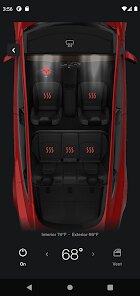
- 🌡️ Climate control that pre-conditions your cabin to your exact preferences. Beyond simple temperature settings, you can activate seat heaters, defrost windows, and even direct airflow to specific zones before you get in the car.
- 📹 Sentry Mode and Dog Mode management from anywhere. You can review sentry camera footage remotely, adjust sensitivity settings, and enable Dog Mode to keep your pet comfortable with the cabin temperature displayed on the main screen for passersby to see.
pros
- 🏆 Seamless integration between multiple Tesla products - your car settings, energy usage, and charging history all live in one place without juggling accounts.
- 🏆 Real-time updates that actually feel real-time. When you change a setting, the car responds within seconds, not minutes, which builds genuine trust in the remote functionality.
- 🏆 The software update notification system that tells you exactly what features you'll get and how long installation will take, then automatically schedules it during off-peak hours if you choose.
cons
- ⚠️ The app occasionally fails to connect when the car is in deep sleep mode, requiring you to walk closer or wake the car manually by opening the door.
- ⚠️ Sentry Mode camera streaming works inconsistently over cellular data, often buffering or displaying low-resolution footage outside of WiFi range.
- ⚠️ The user interface prioritizes aesthetics over information density, leaving you scrolling through multiple screens to find basic data like tire pressure or odometer readings.
Recommended Apps
![]()
Doodle Master - Glow Art
Hydodo4.5

![]()
Live wallpaper - dope & anime
Jelly Dev4.4![]()
Microsoft Edge: Browse with AI
Microsoft Corporation4.6![]()
How old do i look - Age app
Edia Studio4.1![]()
Google Opinion Rewards
Google LLC4.6![]()
Testerup: Test & Earn Rewards
aestimium GmbH4.2![]()
Find My Phone: Find Lost Phone
FindLostCellPhone4.3![]()
HD Wallpapers (Backgrounds)
Android Station4.4![]()
Google Meet
Google LLC4.4![]()
Toyota
Toyota Motor North America, Inc.4.7![]()
Photo Collage Maker & Editor
Lyrebird Studio4.5![]()
Google Translate
Google LLC4.2![]()
Transparent Live Wallpaper
Mobi Softech3.9![]()
Zodiac & Horoscope: CosmicVibe
Mysterious Apps LLC4.7![]()
Doodle Art: Magic Drawing App
Peaksel Games4.4












Hot Apps
-
![]()
PayByPhone
PayByPhone Technologies Inc .4.9 -
![]()
Direct Express®
i2c Inc.4.3 -
![]()
Klarna | Shop now. Pay later.
Klarna Bank AB (publ)4.3 -
![]()
YouTube
Google LLC4.1 -
![]()
Spotify: Music and Podcasts
Spotify AB4.3 -
![]()
Afterpay - Buy Now Pay Later
Afterpay3.8 -
![]()
Amazon Alexa
Amazon Mobile LLC4.5 -
![]()
PayPal - Send, Shop, Manage
PayPal Mobile4.3 -
![]()
DeepSeek - AI Assistant
DeepSeek4.2 -
![]()
Wise: International Transfers
Wise Payments Ltd.4.7 -
![]()
Affirm: Buy now, pay over time
Affirm, Inc4.7 -
![]()
Instagram
Instagram3.9 -
![]()
Signal Private Messenger
Signal Foundation4.5 -
![]()
Telegram
Telegram FZ-LLC4.1 -
![]()
Bolt: Request a Ride
Bolt Technology4.8 -
![]()
Perplexity - Ask Anything
PerplexityAI4.7 -
![]()
Google Chat
Google LLC4.4 -
![]()
Waze Navigation & Live Traffic
Waze4.2 -
![]()
Microsoft Copilot
Microsoft Corporation4.8 -
![]()
Amazon Fire TV
Amazon Mobile LLC4.1 -
![]()
GroupMe
GroupMe4.5 -
![]()
GasBuddy: Find & Pay for Gas
PDI Software, Inc.3.1 -
![]()
WhatsApp Messenger
WhatsApp LLC4.4 -
![]()
Pandora - Music & Podcasts
Pandora4.1 -
![]()
PolyBuzz: Chat with AI Friends
CLOUD WHALE INTERACTIVE TECHNOLOGY LLC.3.8 -
![]()
Cash App
Block, Inc.4.6 -
![]()
ChatGPT
OpenAI4.8 -
![]()
Blink Home Monitor
Immedia Semiconductor4 -
![]()
Google Pay
Google LLC4.4 -
![]()
ParkMobile: Park. Pay. Go.
Parkmobile, LLC4.3






























Disclaimer
1.Apkspack does not represent any developer, nor is it the developer of any App or game.
2.Apkspack provide custom reviews of Apps written by our own reviewers, and detailed information of these Apps, such as developer contacts, ratings and screenshots.
3. All trademarks, registered trademarks, product names and company names or logos appearing on the site are the property of their respective owners.
4.Apkspack abides by the federal Digital Millennium Copyright Act (DMCA) by responding to notices of alleged infringement that complies with the DMCA and other applicable laws.
5.If you are the owner or copyright representative and want to delete your information, please contact us [email protected].
6.All the information on this website is strictly observed all the terms and conditions of Google Ads Advertising policies and Google Unwanted Software policy.
7.Apkspack.com is an independent, information-only website which is 100% free to all the users.