

BitMind: AI Detector & Creator
BitMindAI
Screenshots

editor reviews
BitMind: AI Detector & Creator tackles a growing problem in the digital world: telling human-made content apart from AI-generated material. As AI tools like ChatGPT and image generators become normal in daily work, figuring out what's real or made by a machine gets harder. BitMind steps in with a pair of tools — one to spot AI content and another to create it — all in one app. It targets writers, students, content moderators, and basically anyone online who wants to confirm if text or images came from a person or an algorithm.
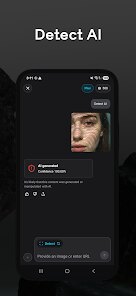
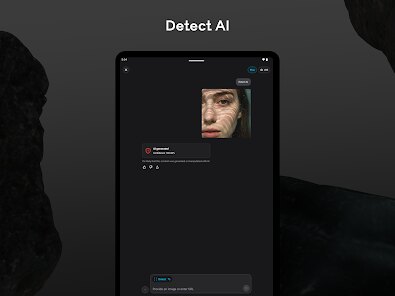
The app does a solid job at its core task: scanning content and giving a clear score about how likely it is AI-generated. I tested it with a few ChatGPT paragraphs and some of my own writing, and the results matched pretty closely with what I expected. I had trouble with an old blog post that I heavily edited after using AI, and the app still flagged parts of it — which told me it can detect leftover AI patterns that might be hard for a person to spot. The detection speed is fast, usually under 10 seconds for a page of text. It also has a history log, which helps if you're checking a bunch of content and want to keep track. But I should note that the creation side feels secondary; the image generator works fine but doesn't stand out from other free tools. It's clearly a detection-first app with creation as a side bonus.
I'd recommend BitMind to editors, teachers, or journalists who need a quick check for AI content before publishing or grading. It's also useful for social media managers verifying user-generated content. If your main need is straightforward AI detection without fussy extra features, this app does the job well. But if you're looking for a powerful creation tool, you'll probably want to pair it with something else. It's most useful when you're in doubt about a document or image and need a fast, reliable second opinion.
features
- 🤖 AI content detection with percentage scoring: The app gives a clear "AI likelihood" percentage for any text or image you upload. It isn't just a yes/no answer — you get a number that shows how confident the system is. Helpful if you want more nuance, like when content mixes human and AI writing.
- 📸 Image authenticity check: It reviews images for signs of AI generation, like unusual patterns or artifacts that don't show up in regular photos. I tried it with a few AI-made images from DALL-E, and it caught most of them. Perfect for verifying profile pictures or product images online.
- 📜 History and saved results: Every scan gets saved in a log, so you can go back and check past results. I really liked this for batch checking blog drafts. Makes it easy to compare multiple items without redoing scans every time.
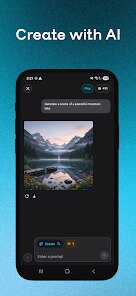
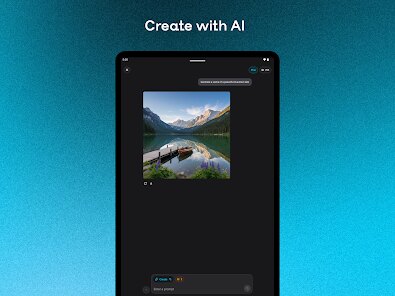
- ✍️ Built-in AI text/image creator: You can generate content inside the app instead of switching tools. The text generator is basic but works for short posts or headlines. The image generator feels less refined, but it's there if you need a quick visual.
pros
- 🎯 High accuracy on standard AI content: The detection is sharp with common AI models. It correctly flagged 9 out of 10 sample texts I tested from ChatGPT and Claude. Reliable when you're dealing with typical AI output.
- ⚡ Fast scanning speed: Results come back in seconds, even with longer documents. No waiting around. Great for high-volume checking, like when a teacher reviews a stack of student essays.
- 📱 Simple interface: The layout is clean and easy to navigate. No confusing menus or hidden features. You upload, scan, and get your answer immediately.
cons
- ⚠️ Struggles with heavily edited AI content: Content that starts with AI but gets major human edits often shows false positives. I tested a heavily rewritten AI draft, and it still flagged large sections. Can give unreliable results for mixed content.
- 🛑 Limited creation tools: The creator side feels half-finished. The image generator has few style options and doesn't match dedicated tools. Feels more like a checkbox feature than a real competitor.
- 🔒 No offline mode: The app requires a constant internet connection for all features. If you're somewhere with spotty service, you're stuck. Limits usability for travelers or people in areas with poor connectivity.
Recommended Apps
![]()
Number Locator - Phone Tracker
Allegany Boys Camp Inc4.6

![]()
Pet To Human - Pet into Human
Applax Pte. Ltd.4.2![]()
Halloween Call: Monster
TeH Software0![]()
Wallpaper 4K, HD – Wallcraft
Nebuchadnezzar DOO4.4![]()
AI Chatbot - Nova
ScaleUp4.7![]()
Photoshop Express Photo Editor
Adobe4.5![]()
Dog Scanner: Breed Recognition
Siwalu Software GmbH4.2![]()
Video Call from Killer Clown -
Dualverse, Inc.3.6![]()
Dola: Smart AI Assistant
SPRING (SG) PTE. LTD.3.9![]()
Girly Lock Screen Wallpaper
Prometheus Interactive LLC3.9![]()
Custom Skin Creator Minecraft
Blakzero4.4![]()
Hiface - Face Shape Detector
Hiface2.5![]()
Period Calendar Period Tracker
Simple Design Ltd.4.9![]()
MagicWidgets: Themepack & Icon
One Office Premium3.3![]()
Love Detector - Fingerprints
KOSHINA APPS0














Hot Apps
-
![]()
Klarna | Shop now. Pay later.
Klarna Bank AB (publ)4.3 -
![]()
DeepSeek - AI Assistant
DeepSeek4.2 -
![]()
GroupMe
GroupMe4.5 -
![]()
Spotify: Music and Podcasts
Spotify AB4.3 -
![]()
TikTok
TikTok Pte. Ltd.4.4 -
![]()
Cash App
Block, Inc.4.6 -
![]()
TikTok - Videos, Shop & LIVE
TikTok Pte. Ltd.4.1 -
![]()
Netflix
Netflix, Inc.3.9 -
![]()
Pandora - Music & Podcasts
Pandora4.1 -
![]()
Bolt: Request a Ride
Bolt Technology4.8 -
![]()
Microsoft Teams
Microsoft Corporation4.6 -
![]()
Instagram
Instagram3.9 -
![]()
OfferUp: Buy. Sell. Letgo.
OfferUp Inc.4.4 -
![]()
Perplexity - Ask Anything
PerplexityAI4.7 -
![]()
Blink Home Monitor
Immedia Semiconductor4 -
![]()
Zoom - One Platform to Connect
zoom.us4.1 -
![]()
SiriusXM: Music, Sports & News
Sirius XM Radio Inc4.8 -
![]()
Grok
xAI4.9 -
![]()
Passport Parking
Passport Labs, Inc.2.5 -
![]()
FaceApp: Perfect Face Editor
FaceApp Technology Ltd4.4 -
![]()
Domino's Pizza USA
Domino's Pizza LLC4.7 -
![]()
Direct Express®
i2c Inc.4.3 -
![]()
Snapmint: Buy Now, Pay in EMIs
Snapmint4.5 -
![]()
letgo: Buy & Sell Used Stuff
letgo3.3 -
![]()
Geeni
Merkury Innovations4.6 -
![]()
Facebook
Meta Platforms, Inc.4 -
![]()
Yuka - Food & cosmetic scan
Yuka App4.7 -
![]()
Uber - Request a ride
Uber Technologies, Inc.4.5 -
![]()
Google Chat
Google LLC4.4 -
![]()
Signal Private Messenger
Signal Foundation4.5






























Disclaimer
1.Apkspack does not represent any developer, nor is it the developer of any App or game.
2.Apkspack provide custom reviews of Apps written by our own reviewers, and detailed information of these Apps, such as developer contacts, ratings and screenshots.
3. All trademarks, registered trademarks, product names and company names or logos appearing on the site are the property of their respective owners.
4.Apkspack abides by the federal Digital Millennium Copyright Act (DMCA) by responding to notices of alleged infringement that complies with the DMCA and other applicable laws.
5.If you are the owner or copyright representative and want to delete your information, please contact us [email protected].
6.All the information on this website is strictly observed all the terms and conditions of Google Ads Advertising policies and Google Unwanted Software policy.
7.Apkspack.com is an independent, information-only website which is 100% free to all the users.