Screen Recorder Video Recorder
Video Screen Recorder, Voice Audio Editor, Cut MP3
Screenshots
editor reviews
Screen Recorder Video Recorder, from the developer behind Video Screen Recorder, Voice Audio Editor, and Cut MP3, is essentially a Swiss Army knife for on-device capture and basic editing. Its core function is straightforward: record whatever's on your screen, with or without audio commentary from the microphone, and then trim or tweak the resulting clip. But while the basic recording works well enough, calling it a powerhouse would be stretching the truth. It's aimed at casual users – someone who needs to quickly capture a game moment, a video call snippet, or a step-by-step tutorial without wading through professional-grade complexity. For those just needing a simple, all-in-one capture tool, it certainly fits the bill.
What sets it apart from the crowded field of screen recorders is the inclusion of a basic video editor and audio cutter. After recording, you can trim the beginning and end, cut out middle segments, or even extract the audio track. I personally found this useful for a quick project where I recorded a software walkthrough. I could record the entire process, then jump into the editor to snip out the mistakes and pauses, all without leaving the app. It solved my immediate need for a clean, edited clip without the hassle of transferring files to a separate editing suite. The audio editor also came in handy when I needed to grab the sound from a recorded lecture as a standalone MP3 file. It's not going to replace Audacity, but for these quick tasks, it's incredibly convenient.
However, it's important to manage expectations. The editor is basic, lacking layers, transitions, or any advanced effects. The app also throws in a lot of ads, which can be intrusive, especially when you're in the middle of editing. I'd recommend this app to students capturing online classes, gamers sharing short clips on social media, or anyone who needs a quick and easy way to record and lightly trim screen activity. It's less suitable for professional content creators who need high bitrate control, advanced audio mixing, or multi-track editing. For simple capture and basic cuts, it does the job admirably.
features
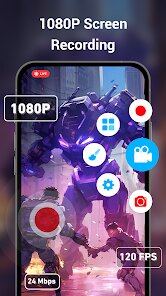
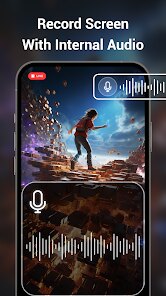
- 🎥 Screen Recording with Audio: The primary function works reliably, allowing you to record internal audio, external microphone audio, or both. The floating control button makes it easy to start, pause, and stop recordings without leaving your current app. The quality is decent for most casual use cases, though you won't find granular bitrate or resolution settings without digging into the menus.
- ✂️ Video Trimmer and Cutter: This is the standout feature. After recording, you can trim the ends or cut out specific sections of the video. The interface is simple – just drag the handles on a timeline to select the portion you want to keep or remove. It's perfect for removing awkward silences or mistakes at the beginning of a recording.
- 🎵 Audio Extractor and Editor: A surprisingly handy tool that lets you separate the audio track from any video file. You can then trim that audio file or convert it to MP3 format. This is great for saving music from a video, extracting a speech from a presentation, or creating ringtones from your favorite clips.
- 📷 Screenshot Capture: Beyond video, the app also offers a screenshot function. While basic, it's a nice convenience to have everything in one place. You can capture a still frame from a video or take a quick snap of the screen without switching to another tool.
pros
- 💪 Simplicity and Ease of Use: The app's biggest strength is its straightforward design. You don't need a manual to figure out how to record or cut a video. Everything is accessible from a clean main screen, making it perfect for users who just want results without a learning curve.
- ⚙️ Integrated Workflow: Having recording, trimming, audio extraction, and screenshot capture all in one app is a massive time-saver. You can go from capturing a clip to sharing a final, polished version in seconds, without juggling multiple applications.
- 🎯 Low Barrier to Entry: The app is free to start, which makes it an excellent option for anyone who isn't sure if they need a dedicated screen recorder. You can test it out and see if it meets your needs without any financial commitment.
cons
- 📺 Excessive Advertisements: The free version is heavily ad-supported. Pop-ups and banner ads appear frequently, sometimes right in the middle of an editing task, which can be very disruptive to the workflow. It's a definite drawback for daily use.
- 🖥️ Limited Editing Features: The video editor, while functional, is very basic. There are no filters, transitions, text overlays, or speed controls. Users needing more than simple trimming will quickly outgrow this app and need to look elsewhere.
- 🔧 Inconsistent Performance: On older or less powerful devices, the app can occasionally stutter during recording, especially when capturing high-resolution or fast-moving content like games. The editor can also be a bit laggy when processing longer video files.
Recommended Apps
![]()
Doodle Master - Glow Art
Hydodo4.5

![]()
Live wallpaper - dope & anime
Jelly Dev4.4![]()
Microsoft Edge: Browse with AI
Microsoft Corporation4.6![]()
How old do i look - Age app
Edia Studio4.1![]()
Google Opinion Rewards
Google LLC4.6![]()
Testerup: Test & Earn Rewards
aestimium GmbH4.2![]()
Find My Phone: Find Lost Phone
FindLostCellPhone4.3![]()
HD Wallpapers (Backgrounds)
Android Station4.4![]()
Google Meet
Google LLC4.4![]()
Toyota
Toyota Motor North America, Inc.4.7![]()
Photo Collage Maker & Editor
Lyrebird Studio4.5![]()
Google Translate
Google LLC4.2![]()
Transparent Live Wallpaper
Mobi Softech3.9![]()
Zodiac & Horoscope: CosmicVibe
Mysterious Apps LLC4.7![]()
Doodle Art: Magic Drawing App
Peaksel Games4.4















Hot Apps
-
![]()
Duolingo: Language & Chess
Duolingo4.7 -
![]()
Waze Navigation & Live Traffic
Waze4.2 -
![]()
Wise: International Transfers
Wise Payments Ltd.4.7 -
![]()
PolyBuzz: Chat with AI Friends
CLOUD WHALE INTERACTIVE TECHNOLOGY LLC.3.8 -
![]()
ChatBot - AI Chat
X PhotoKit4.5 -
![]()
Domino's Pizza USA
Domino's Pizza LLC4.7 -
![]()
Amazon Alexa
Amazon Mobile LLC4.5 -
![]()
Uber Eats: Food Delivery
Uber Technologies, Inc.4.6 -
![]()
Klarna | Shop now. Pay later.
Klarna Bank AB (publ)4.3 -
![]()
Ticketmaster-Buy, Sell Tickets
Ticketmaster L.L.C.3 -
![]()
PayByPhone
PayByPhone Technologies Inc .4.9 -
![]()
ParkMobile: Park. Pay. Go.
Parkmobile, LLC4.3 -
![]()
Venmo
PayPal, Inc.4.2 -
![]()
Microsoft Teams
Microsoft Corporation4.6 -
![]()
WhatsApp Messenger
WhatsApp LLC4.4 -
![]()
ChatOn - AI Chat Bot Assistant
AIBY Inc.4.4 -
![]()
Instagram
Instagram3.9 -
![]()
Affirm: Buy now, pay over time
Affirm, Inc4.7 -
![]()
CapCut - Video Editor
Bytedance Pte. Ltd.4 -
![]()
DoorDash - Food Delivery
DoorDash4.6 -
![]()
Telegram
Telegram FZ-LLC4.1 -
![]()
Google Pay
Google LLC4.4 -
![]()
PayPal - Send, Shop, Manage
PayPal Mobile4.3 -
![]()
Blink Home Monitor
Immedia Semiconductor4 -
![]()
Pandora - Music & Podcasts
Pandora4.1 -
![]()
Geeni
Merkury Innovations4.6 -
![]()
Snapchat
Snap Inc4.1 -
![]()
Amazon Fire TV
Amazon Mobile LLC4.1 -
![]()
Google Chat
Google LLC4.4 -
![]()
Google Gemini
Google LLC4.6






























Disclaimer
1.Apkspack does not represent any developer, nor is it the developer of any App or game.
2.Apkspack provide custom reviews of Apps written by our own reviewers, and detailed information of these Apps, such as developer contacts, ratings and screenshots.
3. All trademarks, registered trademarks, product names and company names or logos appearing on the site are the property of their respective owners.
4.Apkspack abides by the federal Digital Millennium Copyright Act (DMCA) by responding to notices of alleged infringement that complies with the DMCA and other applicable laws.
5.If you are the owner or copyright representative and want to delete your information, please contact us [email protected].
6.All the information on this website is strictly observed all the terms and conditions of Google Ads Advertising policies and Google Unwanted Software policy.
7.Apkspack.com is an independent, information-only website which is 100% free to all the users.