
AndrOpen Office
Akikazu Yoshikawa
Screenshots
editor reviews
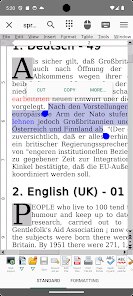
After testing dozens of mobile productivity apps over the years, I finally found one that genuinely respects desktop formatting and file compatibility. AndrOpen Office, developed by Akikazu Yoshikawa, isn't just another office viewer that butchers complex documents. This app brings the full OpenOffice suite to Android devices, which means you get Writer, Calc, Impress, Draw, and Math all packed into a single application. It targets users who regularly handle Microsoft Office files, OpenDocument formats, or PDFs directly on their phones or tablets.
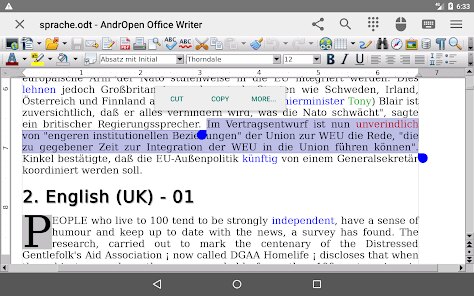
The core purpose here is simple: provide a complete office suite that preserves formatting when you open and edit documents created on desktop software. I've seen too many apps that claim to support .docx or .xlsx files only to strip away tables, fonts, and layout. What separates AndrOpen Office from those alternatives is its underlying engine. Since it's built on the same codebase as OpenOffice for desktops, the rendering engine handles complex formatting much more reliably than typical Android office apps. The file compatibility extends to almost every format you'd encounter in professional environments.
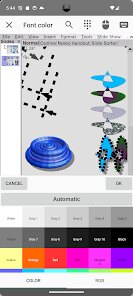
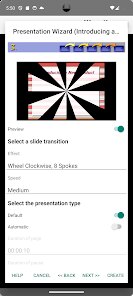
In my testing, the app saved me during a conference when I needed to tweak a presentation someone sent as a .ppt file with embedded charts and custom animations. Other office apps either crashed or showed blank placeholders, but AndrOpen Office rendered everything properly and let me make real edits without losing the original formatting. That alone made it worth installing permanently on my device. I would recommend this app to anyone who regularly receives formatted documents from colleagues or clients and needs reliable mobile access. Students who submit assignments in specific formats, freelancers handling client files, and business travelers who need to make last-minute changes on the go will find this app particularly useful.
features
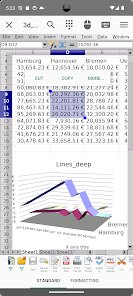
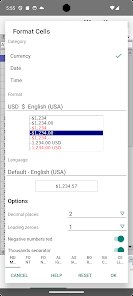
- Full OpenOffice equivalence - The app runs the actual OpenOffice code modified for Android, not a simplified imitation. This means macros, conditional formatting, and formula logic all work the same way they would on desktop. You can open a spreadsheet with complex VLOOKUP chains and edit them without breaking the cell relationships.
- Multi-window support on tablets - On larger screens, you can run Writer and Calc side by side, or keep a PDF reference open while typing up notes. This genuinely improves workflow for research or report writing tasks where you need to cross-reference information across different document types.
- Direct PDF export and import - Beyond simple viewing, the app lets you export any document to PDF while preserving hyperlinks, bookmarks, and embedded images. It also imports PDFs for basic annotation, though heavy editing remains limited compared to dedicated PDF editors.
pros
- Formatting preservation - Documents open looking exactly as intended, with fonts, margins, and table structures intact. This alone makes it superior to most mobile alternatives that rely on guesswork for rendering.
- No subscription model - You pay once and get the full suite without recurring fees or feature paywalls. Cloud storage integrations and additional templates don't cost extra.
- Macro and scripting support - Advanced users can run StarBasic macros and Python scripts directly on their device, which is nearly unheard of in mobile office apps.
cons
- Interface feels dated - The UI resembles older desktop software rather than modern Android design patterns. Menus and toolbars are functional but not optimized for touch gestures or one-handed operation.
- Performance on low-end devices - Opening large spreadsheets with thousands of rows or presentations with high-resolution images causes noticeable lag. Phones with less than 4GB RAM struggle noticeably during heavy editing.
- Limited cloud integration - Unlike competitors that seamlessly connect to Google Drive or OneDrive, you must manually download files before opening them in AndrOpen Office. No direct save-to-cloud functionality exists.
Recommended Apps
![]()
Number Locator - Phone Tracker
Allegany Boys Camp Inc4.6

![]()
Pet To Human - Pet into Human
Applax Pte. Ltd.4.2![]()
Halloween Call: Monster
TeH Software0![]()
Wallpaper 4K, HD – Wallcraft
Nebuchadnezzar DOO4.4![]()
AI Chatbot - Nova
ScaleUp4.7![]()
Photoshop Express Photo Editor
Adobe4.5![]()
Dog Scanner: Breed Recognition
Siwalu Software GmbH4.2![]()
Video Call from Killer Clown -
Dualverse, Inc.3.6![]()
Dola: Smart AI Assistant
SPRING (SG) PTE. LTD.3.9![]()
Girly Lock Screen Wallpaper
Prometheus Interactive LLC3.9![]()
Custom Skin Creator Minecraft
Blakzero4.4![]()
Hiface - Face Shape Detector
Hiface2.5![]()
Period Calendar Period Tracker
Simple Design Ltd.4.9![]()
MagicWidgets: Themepack & Icon
One Office Premium3.3![]()
Love Detector - Fingerprints
KOSHINA APPS0













Hot Apps
-
![]()
Chai: Chat AI Platform
Chai Research Corp.4.3 -
![]()
Amazon Fire TV
Amazon Mobile LLC4.1 -
![]()
ChatBot - AI Chat
X PhotoKit4.5 -
![]()
FaceApp: Perfect Face Editor
FaceApp Technology Ltd4.4 -
![]()
CapCut - Video Editor
Bytedance Pte. Ltd.4 -
![]()
Google Maps
Google LLC4.2 -
![]()
Google Gemini
Google LLC4.6 -
![]()
Grok
xAI4.9 -
![]()
Uber - Request a ride
Uber Technologies, Inc.4.5 -
![]()
Venmo
PayPal, Inc.4.2 -
![]()
Afterpay - Buy Now Pay Later
Afterpay3.8 -
![]()
Google Chat
Google LLC4.4 -
![]()
Hulu: Stream TV shows & movies
Disney4.5 -
![]()
WhatsApp Messenger
WhatsApp LLC4.4 -
![]()
Domino's Pizza USA
Domino's Pizza LLC4.7 -
![]()
Blink Home Monitor
Immedia Semiconductor4 -
![]()
Sora by OpenAI
OpenAI4.7 -
![]()
Signal Private Messenger
Signal Foundation4.5 -
![]()
Cash App
Block, Inc.4.6 -
![]()
TikTok
TikTok Pte. Ltd.4.4 -
![]()
Yuka - Food & cosmetic scan
Yuka App4.7 -
![]()
Ford™
Ford Motor Co.4.7 -
![]()
Passport Parking
Passport Labs, Inc.2.5 -
![]()
SiriusXM: Music, Sports & News
Sirius XM Radio Inc4.8 -
![]()
Snapmint: Buy Now, Pay in EMIs
Snapmint4.5 -
![]()
Amazon Alexa
Amazon Mobile LLC4.5 -
![]()
MyFitnessPal: Calorie Counter
MyFitnessPal, Inc.4.3 -
![]()
Perplexity - Ask Anything
PerplexityAI4.7 -
![]()
Snapchat
Snap Inc4.1 -
![]()
Ticketmaster-Buy, Sell Tickets
Ticketmaster L.L.C.3






























Disclaimer
1.Apkspack does not represent any developer, nor is it the developer of any App or game.
2.Apkspack provide custom reviews of Apps written by our own reviewers, and detailed information of these Apps, such as developer contacts, ratings and screenshots.
3. All trademarks, registered trademarks, product names and company names or logos appearing on the site are the property of their respective owners.
4.Apkspack abides by the federal Digital Millennium Copyright Act (DMCA) by responding to notices of alleged infringement that complies with the DMCA and other applicable laws.
5.If you are the owner or copyright representative and want to delete your information, please contact us [email protected].
6.All the information on this website is strictly observed all the terms and conditions of Google Ads Advertising policies and Google Unwanted Software policy.
7.Apkspack.com is an independent, information-only website which is 100% free to all the users.