
Photo Frames
Csmartworld
Screenshots





editor reviews
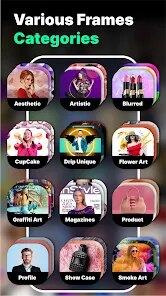
Photo Frames by Csmartworld is a straightforward mobile application designed specifically for users who want to add creative borders, artistic filters, and decorative elements to their photos without needing professional editing skills. The app's primary function revolves around providing a collection of themed frame templates that users can overlay onto their existing pictures, turning a simple snapshot into something more visually appealing or suitable for a special occasion.
The target audience is quite broad, ranging from casual social media users looking to spice up their profile pictures to individuals preparing personalized gifts like framed family photos or greeting cards. It solves the common problem of not having access to sophisticated design software or the time to learn complex editing tools. For me personally, I found the app useful for quickly preparing holiday photos for a family group chat. It saved me from firing up a desktop editor just to add a simple birthday border to a candid shot of my nephew. The core functionality works as intended, with frames applying smoothly, though the variety of styles is basic compared to what you might find on more established platforms. The additional features, such as basic filters and text overlays, add a little extra value, but they are not groundbreaking.
Based on its functions and my experience, I would recommend this app to users who need a fast, no-fuss solution for photo decoration. It is most useful when you want to avoid a steep learning curve and just need a few decent templates to make your photos look a bit more festive or polished. It is not for anyone seeking professional-grade editing, but for simple, occasional use, it gets the job done.
features
- 🎨 The app offers a diverse library of frame categories, including event-specific themes like birthdays, weddings, and holidays, as well as generic artistic borders. This makes it easy to find a suitable frame for whatever occasion you have in mind without scrolling through endless generic options.
- 🖼️ Users can either take a new photo using the in-app camera or select an existing one from their device's gallery. This dual-input approach provides flexibility, allowing you to capture a moment spontaneously or edit a previously saved picture.
- ✏️ Basic editing tools are included, such as pinch-to-zoom, rotate, and drag functionality to adjust the photo within the selected frame. This gives you decent control over the final composition, ensuring your subject is perfectly aligned within the border.
- 💾 Saved images maintain a reasonable resolution, making them suitable for sharing on social media platforms or messaging apps. The export process is quick, and the app does not overly compress the final output, which is a common problem with similar lightweight tools.
pros
- ➕ The interface is very simple and intuitive. Even someone who is not tech-savvy can navigate the main menu and apply a frame within a few seconds, which is the biggest selling point for casual use.
- ➕ Frame styles are applied instantly with no noticeable lag. You can preview changes in real-time, which makes the editing process feel responsive and efficient.
- ➕ The app is lightweight and does not drain your device's battery or storage space. It is a practical utility that does not demand heavy resources.
cons
- ➖ The collection of frames feels somewhat dated and limited in variety. Many of the designs have an old-fashioned aesthetic that may not appeal to users looking for modern, minimalist, or trendy styles.
- ➖ There are occasional intrusive ads that interrupt the workflow. While understandable for a free app, the placement and frequency can be frustrating when you are in the middle of editing.
- ➖ Advanced customization is almost non-existent. Users cannot adjust the thickness, color, or texture of the frames themselves, which severely limits creative control beyond the preset templates.
Recommended Apps
![]()
TouchTunes: Live Bar JukeBox
Touchtunes Interactive Networks3.2
![]()
Pet To Human - Pet into Human
Applax Pte. Ltd.4.2![]()
AR Drawing - Sketchar App
Braly JSC4.2![]()
Photo Frames
Csmartworld4.4![]()
My Prediction Future Wedding
Now Tech3.3![]()
Sora by OpenAI
OpenAI4.7
![]()
LastSeen
Web-Source Ltd3.4![]()
Galaxy Starry Keyboard Backgro
Fun Keyboard Theme for Android4.7![]()
Prediction 2026: Savage Reveal
LKPixel0![]()
Google Chat
Google LLC4.4![]()
Old Me:simulate old face
happy.ai.app2.3![]()
Photo Blender: Picture Mixer
VysionApps4.1![]()
BitMind: AI Detector & Creator
BitMindAI2.8![]()
Clap To Find My Phone
Vasundhara Infotech LLC4.3![]()
LeafSnap Plant Identification
Appixi3.3













Hot Apps
-
![]()
Affirm: Buy now, pay over time
Affirm, Inc4.7 -
![]()
Uber Eats: Food Delivery
Uber Technologies, Inc.4.6 -
![]()
Instagram
Instagram3.9 -
![]()
Google Gemini
Google LLC4.6 -
![]()
Hulu: Stream TV shows & movies
Disney4.5 -
![]()
Pinterest
Pinterest4.5 -
![]()
Google Chrome: Fast & Secure
Google LLC4.1 -
![]()
Grok
xAI4.9 -
![]()
TikTok
TikTok Pte. Ltd.4.4 -
![]()
Perplexity - Ask Anything
PerplexityAI4.7 -
![]()
DoorDash - Food Delivery
DoorDash4.6 -
![]()
Zoom - One Platform to Connect
zoom.us4.1 -
![]()
Pandora - Music & Podcasts
Pandora4.1 -
![]()
Blink Home Monitor
Immedia Semiconductor4 -
![]()
Amazon Fire TV
Amazon Mobile LLC4.1 -
![]()
Domino's Pizza USA
Domino's Pizza LLC4.7 -
![]()
ChatOn - AI Chat Bot Assistant
AIBY Inc.4.4 -
![]()
GroupMe
GroupMe4.5 -
![]()
Spotify: Music and Podcasts
Spotify AB4.3 -
![]()
Geeni
Merkury Innovations4.6 -
![]()
PayPal - Send, Shop, Manage
PayPal Mobile4.3 -
![]()
GasBuddy: Find & Pay for Gas
PDI Software, Inc.3.1 -
![]()
Yuka - Food & cosmetic scan
Yuka App4.7 -
![]()
Passport Parking
Passport Labs, Inc.2.5 -
![]()
SiriusXM: Music, Sports & News
Sirius XM Radio Inc4.8 -
![]()
Google Maps
Google LLC4.2 -
![]()
Cash App
Block, Inc.4.6 -
![]()
ChatBot - AI Chat
X PhotoKit4.5 -
![]()
Waze Navigation & Live Traffic
Waze4.2 -
![]()
Afterpay - Buy Now Pay Later
Afterpay3.8






























Disclaimer
1.Apkspack does not represent any developer, nor is it the developer of any App or game.
2.Apkspack provide custom reviews of Apps written by our own reviewers, and detailed information of these Apps, such as developer contacts, ratings and screenshots.
3. All trademarks, registered trademarks, brand names and company names or logos appearing on the site are the property of their respective owners.
4.Apkspack abides by the federal Digital Millennium Copyright Act (DMCA) by responding to notices of alleged infringement that complies with the DMCA and other applicable laws.
5.If you are the owner or copyright representative and want to delete your information, please contact us [email protected].
6.All the information on this website is strictly observed all the terms and conditions of Google Ads Advertising policies and Google Unwanted Software policy.
7.Apkspack.com is an independent, information-only website which is 100% free to all the users.