Simple Calendar - easy planner
Komorebi Inc.
Screenshots
editor reviews
The Simple Calendar app from Komorebi Inc. markets itself as exactly what the name suggests: a no-fuss planning tool stripped of the overwhelming complexity typical of most calendar apps today. The core purpose here is straightforward — it helps you manage your schedule, set reminders for events, and track deadlines without bombarding you with unnecessary features or a cluttered interface. The target audience is pretty clear: it is for people who find Google Calendar too bloated, who don't need team collaboration tools, and who just want something clean and responsive to keep their personal days organized.
During my time using it, I found that the fundamental features worked exactly as expected. Adding an event takes only a couple of taps, and the light material design actually makes it pleasant to look at. The app helped me solve a specific pain point: I tend to ignore notifications because most calendar apps stress me out with too much visual noise. Simple Calendar's minimal approach meant I actually stuck with it. The additional features, like the built-in to-do list and the week number display, feel like natural additions rather than forced extras. They do not distract from core functionality but quietly improve it.
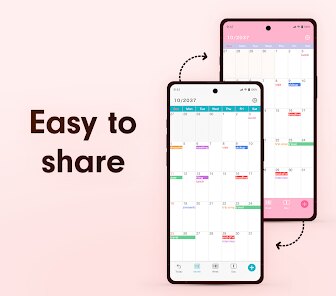
That said, the app is clearly not designed for power users. If you need to sync multiple Google accounts, share calendars with your team, or set complex recurring events with customized patterns, you will likely feel limited. But for the average person who just needs to remember birthdays, appointments, and daily tasks, this app feels just right. I would especially recommend it to older users or people who feel intimidated by modern productivity apps. It also works wonderfully as a secondary calendar — your minimalist escape from the chaos of fully loaded schedule apps. For those with straightforward planning needs, Simple Calendar genuinely simplifies your relationship with time management.
features
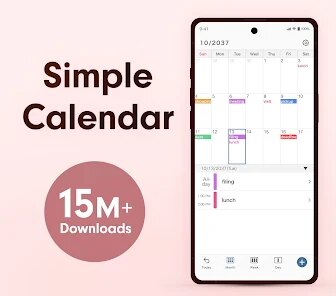
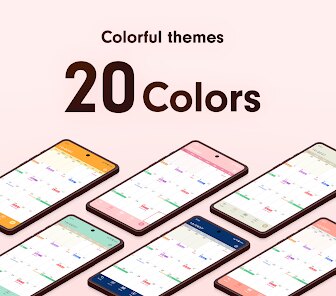
- 📅 A truly clean and clutter-free interface. I never felt lost or overwhelmed when looking at the month view. The colors are soft, the fonts are clear, and there is no attempt to upsell or show ads. Everything just sits where it belongs.
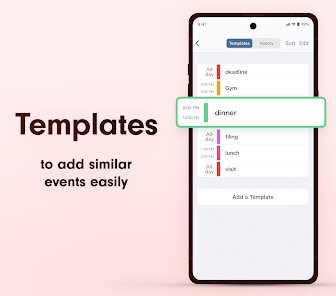
- 📅 Lightweight event creation with smart defaults. When I tap to add an event, the app intelligently assumes a one-hour duration and suggests a default time. This small touch saves me a few seconds every time, and those seconds add up over a week.
- 📅 A simple but effective to-do list integration. Unlike other apps where tasks and events live in separate worlds, this one lets you create simple checklists alongside your calendar. I used it for grocery reminders and small errands, and it reduced my need for a separate task app.
- 📅 Offline reliability. The app does not require a constant internet connection to function. I tested it in airplane mode and all my events were still accessible. This is a big plus for anyone who travels or has limited data.
pros
- 🌟 Battery friendly and resource light. The app never caused my phone to heat up or drain battery in the background. It is well optimized for daily use.
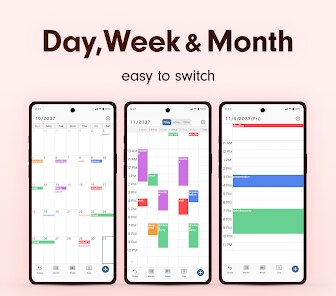
- 🌟 Weekly overview at a glance. The week view is well spaced and readable. I could see my entire week without scrolling much, which helped me plan ahead without stress.
- 🌟 Consistent nag-free experience. There are no pop-up ads or prompts to upgrade. This single thing makes it stand out among free calendar apps today.
cons
- ⚠️ No cloud sync option at all. Everything stays on your device. If you switch phones or lose your data, you cannot recover anything unless you manually back it up.
- ⚠️ Recurring events are too basic. You can set daily or weekly repeats, but anything more complex like "every second Tuesday" requires manual workarounds.
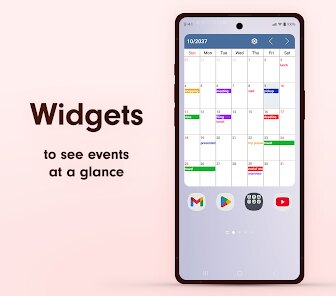
- ⚠️ The widget is functional but ugly. The home screen widget shows your next event but uses a dated font style that clashes with modern Android launchers.
Recommended Apps
![]()
Number Locator - Phone Tracker
Allegany Boys Camp Inc4.6

![]()
Pet To Human - Pet into Human
Applax Pte. Ltd.4.2![]()
Halloween Call: Monster
TeH Software0![]()
Wallpaper 4K, HD – Wallcraft
Nebuchadnezzar DOO4.4![]()
AI Chatbot - Nova
ScaleUp4.7![]()
Photoshop Express Photo Editor
Adobe4.5![]()
Dog Scanner: Breed Recognition
Siwalu Software GmbH4.2![]()
Video Call from Killer Clown -
Dualverse, Inc.3.6![]()
Dola: Smart AI Assistant
SPRING (SG) PTE. LTD.3.9![]()
Girly Lock Screen Wallpaper
Prometheus Interactive LLC3.9![]()
Custom Skin Creator Minecraft
Blakzero4.4![]()
Hiface - Face Shape Detector
Hiface2.5![]()
Period Calendar Period Tracker
Simple Design Ltd.4.9![]()
MagicWidgets: Themepack & Icon
One Office Premium3.3![]()
Love Detector - Fingerprints
KOSHINA APPS0











Hot Apps
-
![]()
Amazon Fire TV
Amazon Mobile LLC4.1 -
![]()
Google Maps
Google LLC4.2 -
![]()
Spotify: Music and Podcasts
Spotify AB4.3 -
![]()
Amazon Alexa
Amazon Mobile LLC4.5 -
![]()
PayByPhone
PayByPhone Technologies Inc .4.9 -
![]()
Signal Private Messenger
Signal Foundation4.5 -
![]()
TikTok
TikTok Pte. Ltd.4.4 -
![]()
Google Gemini
Google LLC4.6 -
![]()
TikTok - Videos, Shop & LIVE
TikTok Pte. Ltd.4.1 -
![]()
DoorDash - Food Delivery
DoorDash4.6 -
![]()
GasBuddy: Find & Pay for Gas
PDI Software, Inc.3.1 -
![]()
Blink Home Monitor
Immedia Semiconductor4 -
![]()
Chai: Chat AI Platform
Chai Research Corp.4.3 -
![]()
Snapchat
Snap Inc4.1 -
![]()
letgo: Buy & Sell Used Stuff
letgo3.3 -
![]()
Uber - Request a ride
Uber Technologies, Inc.4.5 -
![]()
Duolingo: Language & Chess
Duolingo4.7 -
![]()
Google Home
Google LLC4.2 -
![]()
Ford™
Ford Motor Co.4.7 -
![]()
DeepSeek - AI Assistant
DeepSeek4.2 -
![]()
Google Chat
Google LLC4.4 -
![]()
Yuka - Food & cosmetic scan
Yuka App4.7 -
![]()
Netflix
Netflix, Inc.3.9 -
![]()
Telegram
Telegram FZ-LLC4.1 -
![]()
Waze Navigation & Live Traffic
Waze4.2 -
![]()
Direct Express®
i2c Inc.4.3 -
![]()
Domino's Pizza USA
Domino's Pizza LLC4.7 -
![]()
ChatOn - AI Chat Bot Assistant
AIBY Inc.4.4 -
![]()
Instagram
Instagram3.9 -
![]()
Uber Eats: Food Delivery
Uber Technologies, Inc.4.6






























Disclaimer
1.Apkspack does not represent any developer, nor is it the developer of any App or game.
2.Apkspack provide custom reviews of Apps written by our own reviewers, and detailed information of these Apps, such as developer contacts, ratings and screenshots.
3. All trademarks, registered trademarks, product names and company names or logos appearing on the site are the property of their respective owners.
4.Apkspack abides by the federal Digital Millennium Copyright Act (DMCA) by responding to notices of alleged infringement that complies with the DMCA and other applicable laws.
5.If you are the owner or copyright representative and want to delete your information, please contact us [email protected].
6.All the information on this website is strictly observed all the terms and conditions of Google Ads Advertising policies and Google Unwanted Software policy.
7.Apkspack.com is an independent, information-only website which is 100% free to all the users.