
Reverse Voice - Voice Changer
Hammad67
Screenshots
editor reviews
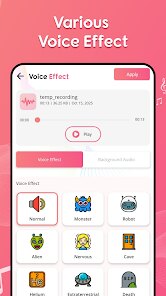
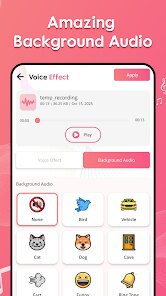
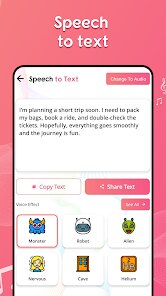
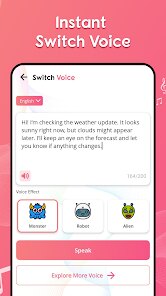
Reverse Voice - Voice Changer is a niche audio utility that flips the way we think about voice modulation. Instead of the typical real-time pitch shifting or effects-heavy tools, this app focuses on reversing audio clips—playing them backward to create that eerie, scrambled sound often used for creative projects, pranks, or even casual fun. It's a straightforward tool, not a full-blown audio editor, and that simplicity is its main draw.
The target audience is pretty broad but specific at the same time. Content creators, especially those working on short-form videos for platforms like TikTok or Instagram, might find it useful for adding a twist to their intros or outros. Gamers and streamers could use it for voice-based challenges, like speaking backward and having viewers guess the message. I also see it appealing to people who just want to mess around with friends—sending reversed voice messages or creating funny audio snippets. The core problem it solves is the hassle of manually reversing audio through complex software. Most people don't have the time or patience to open up Audacity, import a file, reverse it, and export it again. This app cuts that process down to a few taps.
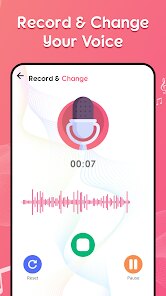
From my own experience, the core feature works as advertised. I recorded a short message, hit the reverse button, and the output was a perfectly scrambled version of my voice. It's a bit unsettling to hear your own words turned into gibberish, but that's exactly the point. The app also includes a basic recording function and the ability to import existing audio files, which is handy. However, I noticed the interface feels a bit bare-bones—there's no playback speed control or audio trimming, so you have to work with whatever you record or import as-is. That said, it did what I needed it to do without any crashes or glitches. I'd recommend this app to anyone who wants a no-frills, one-trick pony for voice reversal. It's not for serious audio production, but for quick laughs or creative experiments, it gets the job done.
features
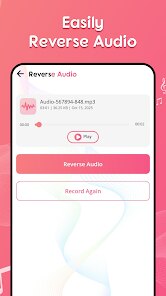
- 🎤 Reverse audio in seconds: The main feature is exactly what it sounds like. You record a clip or pick one from your library, and with a single press, the app flips the entire waveform backward. The processing is nearly instant, and the output is clear—no weird artifacts or distortion like I've seen in some other tools. It's perfect for making voice notes sound like they're from a ghost or a secret message.
- 📁 Import existing audio files: Not every tool lets you work with pre-recorded content, but this one does. I tested it with a short MP3 file of a podcast snippet, and it reversed it without any issues. This is a big plus for users who want to apply the effect to music, sound effects, or any audio they already have saved on their device.
- 🔄 Save and share reversed clips: After reversing, you can save the new audio to your device or share it directly to other apps like WhatsApp or social media. The sharing integration is smooth, and the saved file maintains decent quality. I found this really useful for quickly sending a prank voice message to a friend without having to juggle multiple apps.
pros
- ⚡ Lightning-fast processing: The app reverses audio in real time, so you don't wait around. This makes it ideal for on-the-go use when you want a quick result.
- 🔒 Simple and focused design: No clutter or confusing menus. Everything is laid out clearly, which lowers the learning curve for non-technical users.
- 📱 Lightweight and responsive: The app didn't hog my phone's resources or slow down other tasks. It's a small download and runs smoothly even on older devices.
cons
- 🔇 No playback speed adjustment: You can't slow down or speed up the reversed audio, which limits creative control. Sometimes a slower reversal sounds more dramatic, but that's not an option here.
- ✂️ Missing audio trimming: The app reverses the entire clip. If you record a long message and only want to reverse the middle part, you're out of luck. A basic trim tool would solve this.
- 🎚️ Limited audio quality settings: There's no way to adjust bitrate or export format. The output is locked, which might not satisfy users who need high-fidelity files for professional projects.
Recommended Apps
![]()
Lie Detector Test Prank (Joke)
Neko Soft3.9

![]()
The Prank App - Funny Sounds
Apps from da Woodz4.5![]()
Hair Clipper Prank
Cüneyt AYYILDIZ3.9![]()
PayPal - Send, Shop, Manage
PayPal Mobile4.3![]()
Mini Quiz Filter Challenge
GjangHa3.9![]()
QR Code Scanner
QR Code Scanner & Barcode Reader4.7![]()
McDonald's
McDonalds USA, LLC4.6![]()
Life360: Live Location Sharing
Life3604.6![]()
Wednesday Addams Prank Call
Prank Calling4![]()
Firefox Fast & Private Browser
Mozilla4.6![]()
AI ChatBot AI Friend Generator
VIDEOSHOW Video Editor & Maker & AI Chat Generator4.5![]()
Bikii Cloud Game
Bikii Game Dev3.5![]()
Celebs - Celebrity Look Alike
Sociaaal LLC4![]()
Skype for Business for Android
Microsoft Corporation4.1![]()
Prediction 2026: Savage Reveal
LKPixel0













Hot Apps
-
![]()
Spotify: Music and Podcasts
Spotify AB4.3 -
![]()
Waze Navigation & Live Traffic
Waze4.2 -
![]()
Passport Parking
Passport Labs, Inc.2.5 -
![]()
Yuka - Food & cosmetic scan
Yuka App4.7 -
![]()
Geeni
Merkury Innovations4.6 -
![]()
MyFitnessPal: Calorie Counter
MyFitnessPal, Inc.4.3 -
![]()
Instagram
Instagram3.9 -
![]()
DeepSeek - AI Assistant
DeepSeek4.2 -
![]()
Microsoft Copilot
Microsoft Corporation4.8 -
![]()
ChatOn - AI Chat Bot Assistant
AIBY Inc.4.4 -
![]()
Domino's Pizza USA
Domino's Pizza LLC4.7 -
![]()
Duolingo: Language & Chess
Duolingo4.7 -
![]()
Klarna | Shop now. Pay later.
Klarna Bank AB (publ)4.3 -
![]()
Sora by OpenAI
OpenAI4.7 -
![]()
Google Home
Google LLC4.2 -
![]()
PolyBuzz: Chat with AI Friends
CLOUD WHALE INTERACTIVE TECHNOLOGY LLC.3.8 -
![]()
Microsoft Teams
Microsoft Corporation4.6 -
![]()
Amazon Alexa
Amazon Mobile LLC4.5 -
![]()
CapCut - Video Editor
Bytedance Pte. Ltd.4 -
![]()
DoorDash - Food Delivery
DoorDash4.6 -
![]()
Snapmint: Buy Now, Pay in EMIs
Snapmint4.5 -
![]()
OfferUp: Buy. Sell. Letgo.
OfferUp Inc.4.4 -
![]()
Blink Home Monitor
Immedia Semiconductor4 -
![]()
Ford™
Ford Motor Co.4.7 -
![]()
Hulu: Stream TV shows & movies
Disney4.5 -
![]()
GasBuddy: Find & Pay for Gas
PDI Software, Inc.3.1 -
![]()
ParkMobile: Park. Pay. Go.
Parkmobile, LLC4.3 -
![]()
Google Maps
Google LLC4.2 -
![]()
TikTok
TikTok Pte. Ltd.4.4 -
![]()
FaceApp: Perfect Face Editor
FaceApp Technology Ltd4.4






























Disclaimer
1.Apkspack does not represent any developer, nor is it the developer of any App or game.
2.Apkspack provide custom reviews of Apps written by our own reviewers, and detailed information of these Apps, such as developer contacts, ratings and screenshots.
3. All trademarks, registered trademarks, product names and company names or logos appearing on the site are the property of their respective owners.
4.Apkspack abides by the federal Digital Millennium Copyright Act (DMCA) by responding to notices of alleged infringement that complies with the DMCA and other applicable laws.
5.If you are the owner or copyright representative and want to delete your information, please contact us [email protected].
6.All the information on this website is strictly observed all the terms and conditions of Google Ads Advertising policies and Google Unwanted Software policy.
7.Apkspack.com is an independent, information-only website which is 100% free to all the users.