Anime Shimeji Screen Pets
NovaSoftLC Labs
Screenshots

editor reviews
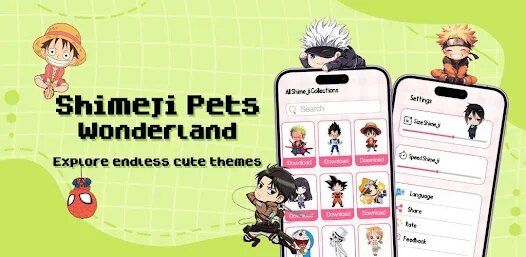
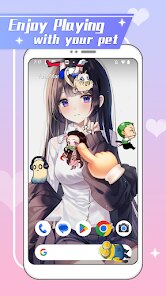
Anime Shimeji Screen Pets brings a playful twist to your everyday desktop experience by turning popular anime characters into interactive virtual companions that roam freely across your screen. The core concept is simple: instead of a static wallpaper or a silent screen, you get lively little characters who wander, climb windows, and occasionally interact with each other or your open applications. It's a novelty app first and foremost, designed for anime enthusiasts who enjoy having their favorite characters close by while working or browsing.
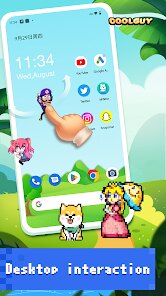
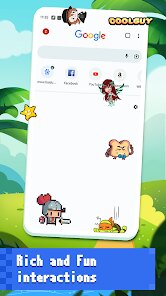
The app's main appeal lies in its ability to add a layer of personality to an otherwise sterile digital workspace. When I first installed it, I was struck by how the characters moved with surprising fluidity—they glide along the edges of windows, occasionally perform small animations like stretching or waving, and even play around with other characters on screen. It felt less like a background program and more like a tiny diorama coming to life. For someone like me who spends long hours in front of a computer, these little movements turned out to be a pleasant distraction rather than an annoyance. They break the monotony without demanding my attention.
That said, this app isn't for everyone. If you value a clean, minimalist desktop or do tasks requiring high concentration, the constant movement could become distracting. But for anime fans, casual users, or anyone looking to personalize their digital space with something fun and lighthearted, Anime Shimeji Screen Pets is a delightful choice. It's best used during downtime, while browsing social media, or when you just want a friend on your screen during a late-night study session.
features
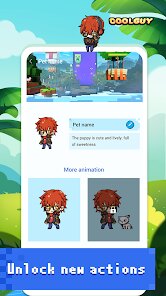
- 🎯 Interactive screen pets: Each character responds to mouse clicks and drags. Tap on them, and they react with cute emotes or special animations like jumping or blushing. Dragging them around feels surprisingly responsive, adding a tactile layer to the experience.
- 🎯 Customizable character set: You can choose from a small but solid library of anime-style characters. The option to import or add your own sprites via simple image files is hidden in the settings—once discovered, it dramatically expands the possibilities for personalization.
- 🎯 Desktop behavior modes: Characters can be set to wander freely or confined to a specific area of the screen. There's a “quiet mode” that reduces movement frequency, which I found useful during focused work without completely losing the pet experience.
- 🎯 Lightweight performance: Despite running continuously, the app barely sips system resources. I tested it on a modest laptop, and the CPU usage stayed under 2 percent, with no noticeable battery drain compared to similar widget tools.
pros
- 👍 Smooth and fluid animations make the characters feel alive and charming, not stiff or robotic.
- 👍 Very low system footprint allows for long-term background usage without slowing down your computer.
- 👍 The drag-and-click interactivity adds a playful dimension beyond just watching static sprites.
cons
- 👎 Limited built-in character library—most users will want to find or create custom sprites quickly.
- 👎 No built-in tutorial or onboarding, leaving some advanced features like import buried in menus.
- 👎 Occasionally, characters clip through window titles or get stuck behind taskbars, requiring a restart.
Recommended Apps
![]()
Number Locator - Phone Tracker
Allegany Boys Camp Inc4.6

![]()
Pet To Human - Pet into Human
Applax Pte. Ltd.4.2![]()
Halloween Call: Monster
TeH Software0![]()
Wallpaper 4K, HD – Wallcraft
Nebuchadnezzar DOO4.4![]()
AI Chatbot - Nova
ScaleUp4.7![]()
Photoshop Express Photo Editor
Adobe4.5![]()
Dog Scanner: Breed Recognition
Siwalu Software GmbH4.2![]()
Video Call from Killer Clown -
Dualverse, Inc.3.6![]()
Dola: Smart AI Assistant
SPRING (SG) PTE. LTD.3.9![]()
Girly Lock Screen Wallpaper
Prometheus Interactive LLC3.9![]()
Custom Skin Creator Minecraft
Blakzero4.4![]()
Hiface - Face Shape Detector
Hiface2.5![]()
Period Calendar Period Tracker
Simple Design Ltd.4.9![]()
MagicWidgets: Themepack & Icon
One Office Premium3.3![]()
Love Detector - Fingerprints
KOSHINA APPS0












Hot Apps
-
![]()
TikTok - Videos, Shop & LIVE
TikTok Pte. Ltd.4.1 -
![]()
Telegram
Telegram FZ-LLC4.1 -
![]()
Microsoft Copilot
Microsoft Corporation4.8 -
![]()
Signal Private Messenger
Signal Foundation4.5 -
![]()
letgo: Buy & Sell Used Stuff
letgo3.3 -
![]()
MyFitnessPal: Calorie Counter
MyFitnessPal, Inc.4.3 -
![]()
Cash App
Block, Inc.4.6 -
![]()
Amazon Alexa
Amazon Mobile LLC4.5 -
![]()
Google Gemini
Google LLC4.6 -
![]()
Waze Navigation & Live Traffic
Waze4.2 -
![]()
ParkMobile: Park. Pay. Go.
Parkmobile, LLC4.3 -
![]()
Sora by OpenAI
OpenAI4.7 -
![]()
Yuka - Food & cosmetic scan
Yuka App4.7 -
![]()
DoorDash - Food Delivery
DoorDash4.6 -
![]()
Facebook
Meta Platforms, Inc.4 -
![]()
PayPal - Send, Shop, Manage
PayPal Mobile4.3 -
![]()
YouTube
Google LLC4.1 -
![]()
ChatBot - AI Chat
X PhotoKit4.5 -
![]()
Zoom - One Platform to Connect
zoom.us4.1 -
![]()
Pinterest
Pinterest4.5 -
![]()
CapCut - Video Editor
Bytedance Pte. Ltd.4 -
![]()
Netflix
Netflix, Inc.3.9 -
![]()
SiriusXM: Music, Sports & News
Sirius XM Radio Inc4.8 -
![]()
Perplexity - Ask Anything
PerplexityAI4.7 -
![]()
Google Pay
Google LLC4.4 -
![]()
Google Chrome: Fast & Secure
Google LLC4.1 -
![]()
ChatGPT
OpenAI4.8 -
![]()
Uber Eats: Food Delivery
Uber Technologies, Inc.4.6 -
![]()
Snapchat
Snap Inc4.1 -
![]()
Blink Home Monitor
Immedia Semiconductor4






























Disclaimer
1.Apkspack does not represent any developer, nor is it the developer of any App or game.
2.Apkspack provide custom reviews of Apps written by our own reviewers, and detailed information of these Apps, such as developer contacts, ratings and screenshots.
3. All trademarks, registered trademarks, product names and company names or logos appearing on the site are the property of their respective owners.
4.Apkspack abides by the federal Digital Millennium Copyright Act (DMCA) by responding to notices of alleged infringement that complies with the DMCA and other applicable laws.
5.If you are the owner or copyright representative and want to delete your information, please contact us [email protected].
6.All the information on this website is strictly observed all the terms and conditions of Google Ads Advertising policies and Google Unwanted Software policy.
7.Apkspack.com is an independent, information-only website which is 100% free to all the users.