

PND AI Photo Enhancer HD
PND AI 360
Screenshots



editor reviews
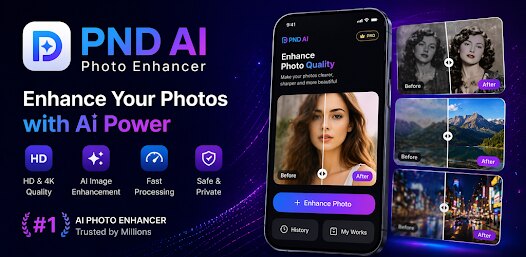
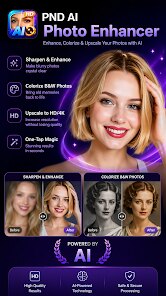
PND AI Photo Enhancer HD is a mobile application designed to breathe new life into old, blurry, or low-resolution photographs. Its primary purpose is to use artificial intelligence to upscale and enhance images, making them clearer and more detailed. This app is particularly aimed at people who have a large collection of older digital photos, scanned prints from family albums, or images downloaded from the internet that didn't come in high quality. It is essentially a solution for anyone who wants to improve the visual fidelity of their personal memories or professional work without needing advanced Photoshop skills.
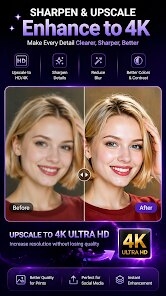
The core function of the app is straightforward: you select a photo from your gallery, choose an enhancement level, and let the AI process it. My own usage revolved around a box of old scanned family photos from the 1980s. The standard enhancement mode did a remarkable job on most images, smoothing out the JPEG artifacts and revealing details I had forgotten were there. For example, my grandmother's patterned dress in a photo from 1985 went from a mushy blur to a discernable floral print. The app also offers a face-specific enhancement mode, which is a standout feature. It intelligently sharpens facial features without making them look waxy or unnatural, which is a common pitfall in many other enhancers. The entire process is fast; most images are processed within 10 to 20 seconds on a standard smartphone. While the free tier limits resolution and applies a watermark, the paid version removes these restrictions and allows for 4K output, which is a significant value-add.
I would recommend PND AI Photo Enhancer HD to amateur historians retouching old family archives, to social media creators who may receive low-quality user-generated content, and finally to anyone trying to salvage a once-in-a-lifetime picture that was taken in poor lighting. It is most useful for batch improvements on older, compressed photos rather than for adding artistic effects or filters. If your main need is to fix focus, reduce noise, and upscale without losing the original character of the photo, this app is a solid choice. It may not replace professional desktop software for heavy-duty restoration, but for a quick, impressive fix on the go, it truly delivers.
features
- 🖼️ The app includes a batch processing feature that allows you to queue multiple images. I tested this with ten photos at once, and the app churned through them without crashing, maintaining consistent quality. This is a serious time saver for large projects like digitizing a shoebox of prints.
- 🖼️ There is a dedicated 'AI Face' mode that specifically targets facial features. When I tested it on a low-light group photo, individual faces became sharper and more expressive while the background remained appropriately soft. It avoids the typical plastic-looking skin texture that generic sharpeners produce.
- 🖼️ The tool offers multiple resolution upscale paths—2x, 4x, and an 'Ultra' setting. The 'Ultra' mode is aggressive, making a 1MP image look decent on a large screen, though it sometimes adds slight sharpening halos. It's impressive for its size, and for standard social media use, the 2x option is usually enough and preserves a more natural look.
pros
- ⭐ The AI engine does an exceptional job with noise reduction. It removes grain from old film scans without blurring the actual image content, which is often the biggest challenge with this type of photo processing.
- ⭐ Ease of use is a major strength. The interface is stripped down to the essentials: import, choose a mode, and export. There are no confusing sliders or color wheels, making it accessible for non-technical users.
- ⭐ The processing speed is remarkably fast for a mobile app. You are not waiting minutes for a single image; most enhancements are done in seconds, which keeps the workflow fluid and frustration-free.
cons
- ⭐ The free version has a noticeable watermark and restricts output to 1080p. If you need to print or use the photos professionally, you must purchase the subscription, which is relatively expensive compared to one-time purchase apps.
- ⭐ There is no 'compare' slider view. You can only see the result after the fact. A side-by-side or swipe overlay to preview the enhancement before saving would significantly improve the user experience.
- ⭐ The app occasionally struggles with very small faces (like those in a large group shot from a distance), sometimes over-sharpening them slightly. It would benefit from an adjustment slider to control the intensity of the enhancement.
Recommended Apps
![]()
Photo Effects, Photo Editor
Lyrebird Studio4.1
![]()
Facemoji:Emoji Keyboard&ASK AI
EKATOX APPS4.5
![]()
Love Detector - Fingerprints
KOSHINA APPS0![]()
Toyota
Toyota Motor North America, Inc.4.7![]()
PixVerse: AI Video Generator
PixVerse4.5![]()
Chai: Chat AI Platform
Chai Research Corp.4.3![]()
Photo Editor Picsa: Collage
Lyrebird Studio4.5![]()
Stickman: draw animation maker
Appache apps and games ltd4.6![]()
Daily Horoscopes 2024
KADO Apps4.3![]()
Custom Skin Creator Minecraft
Blakzero4.4![]()
4K Wallpaper & HD Background
MobWally5![]()
Amazon Prime Video
Amazon Mobile LLC4.2![]()
Text Free: Call & Texting App
Pinger, Inc4.4![]()
AstroBella Astrology & Healing
Moonphase Apps GmbH4.7![]()
TeraBox: 1TB Cloud & AI Space
Flextech Inc.4.4













Hot Apps
-
![]()
PolyBuzz: Chat with AI Friends
CLOUD WHALE INTERACTIVE TECHNOLOGY LLC.3.8 -
![]()
Ticketmaster-Buy, Sell Tickets
Ticketmaster L.L.C.3 -
![]()
Pandora - Music & Podcasts
Pandora4.1 -
![]()
Venmo
PayPal, Inc.4.2 -
![]()
PayPal - Send, Shop, Manage
PayPal Mobile4.3 -
![]()
Perplexity - Ask Anything
PerplexityAI4.7 -
![]()
DeepSeek - AI Assistant
DeepSeek4.2 -
![]()
Wise: International Transfers
Wise Payments Ltd.4.7 -
![]()
Direct Express®
i2c Inc.4.3 -
![]()
Google Gemini
Google LLC4.6 -
![]()
Microsoft Teams
Microsoft Corporation4.6 -
![]()
Klarna | Shop now. Pay later.
Klarna Bank AB (publ)4.3 -
![]()
Zoom - One Platform to Connect
zoom.us4.1 -
![]()
TikTok
TikTok Pte. Ltd.4.4 -
![]()
letgo: Buy & Sell Used Stuff
letgo3.3 -
![]()
DoorDash - Food Delivery
DoorDash4.6 -
![]()
OfferUp: Buy. Sell. Letgo.
OfferUp Inc.4.4 -
![]()
Snapmint: Buy Now, Pay in EMIs
Snapmint4.5 -
![]()
Cash App
Block, Inc.4.6 -
![]()
Uber - Request a ride
Uber Technologies, Inc.4.5 -
![]()
Hulu: Stream TV shows & movies
Disney4.5 -
![]()
Google Pay
Google LLC4.4 -
![]()
Domino's Pizza USA
Domino's Pizza LLC4.7 -
![]()
Google Maps
Google LLC4.2 -
![]()
Chai: Chat AI Platform
Chai Research Corp.4.3 -
![]()
Snapchat
Snap Inc4.1 -
![]()
Google Chat
Google LLC4.4 -
![]()
MyFitnessPal: Calorie Counter
MyFitnessPal, Inc.4.3 -
![]()
Uber Eats: Food Delivery
Uber Technologies, Inc.4.6 -
![]()
Grok
xAI4.9





























Disclaimer
1.Apkspack does not represent any developer, nor is it the developer of any App or game.
2.Apkspack provide custom reviews of Apps written by our own reviewers, and detailed information of these Apps, such as developer contacts, ratings and screenshots.
3. All trademarks, registered trademarks, brand names and company names or logos appearing on the site are the property of their respective owners.
4.Apkspack abides by the federal Digital Millennium Copyright Act (DMCA) by responding to notices of alleged infringement that complies with the DMCA and other applicable laws.
5.If you are the owner or copyright representative and want to delete your information, please contact us [email protected].
6.All the information on this website is strictly observed all the terms and conditions of Google Ads Advertising policies and Google Unwanted Software policy.
7.Apkspack.com is an independent, information-only website which is 100% free to all the users.