
Canva: AI Photo & Video Editor
Canva
Screenshots




editor reviews
Canva has evolved from a simple graphic design platform into a comprehensive creative suite for the mobile age. While the desktop version has long been a favorite for creating social media posts, presentations, and marketing materials, this app brings the same intuitive design principles to your phone or tablet. More importantly, it uses AI to streamline common editing tasks, making it less of a tool and more of a creative partner. The app functions as an all-in-one solution for anyone who needs to produce visually compelling content quickly, from social media managers crafting a month of posts to small business owners designing flyers for their storefront.
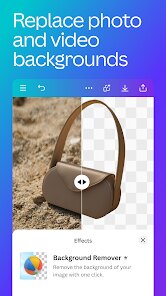
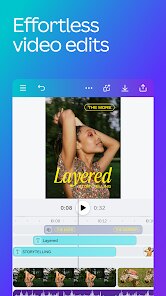
At its heart, the app is built to solve the problem of fragmented workflows. Instead of toggling between a background remover, a video trimmer, and a color corrector, you can handle everything within a single interface. I found the AI-powered features to be particularly practical; for instance, I used the Magic Studio tools to repurpose a product photo I took for an online listing. One tap removed the cluttered background, and another used Magic Grab to shift the subject on a virtual canvas, allowing me to drop in text next to it without needing a separate photo editor. During the testing period, I also created a short promotional reel for a hobby project. The automatic text-based video editing, where it drafts a storyboard from your script, felt like magic. It clipped my footage to match the audio perfectly, saving me over an hour of manual timeline scrubbing.
That said, this is not a fully-fledged replacement for desktop software when tackling complex, multi-layered projects. The screen size is a limitation, and the interface can feel slightly cluttered when all the asset panels are open. However, for quick jobs, on-the-go adjustments, or for someone who just wants to avoid the steep learning curve of professional tools, it is nearly unmatched. I would specifically recommend this to students working on presentations, non-profit volunteers handling an organization's social media, or entrepreneurs who need to maintain a steady flow of branded content without hiring a designer. It fills the gap between high-end professional tools and basic photo filters, offering a middle ground that is accessible to everyone.
features
- 📝 Magic Studio & AI Tools - This suite is the core differentiator. It includes Magic Grab for cutting out objects, Magic Expand for extending images, and Magic Edit for generative fill. These tools allow you to execute complex tasks, like swapping backgrounds or repositioning subjects, with simple text prompts or taps, eliminating the need for manual pixel-perfect selections.
- 🎬 Text-to-Video & Auto-Edit - Users can type a script and the app will automatically arrange stock footage or personal clips to match, complete with voice-over generation available in some regions. This specific feature transforms long-form content into short, punchy videos for TikTok or Reels, with synced captions and transitions added automatically based on the audio analysis.
- 📂 Brand Kit Integration - For businesses, the magic resides in being able to upload logos, fonts, and color palettes once. Your entire team then has instant access to these assets, ensuring every design piece maintains brand consistency without digging through external drives or file folders.
- 🎨 Real-Time Collaboration & Comments - Similar to Google Docs, you can share a design link and let team members leave specific comments or edit the visual in real-time. This turns a solitary design task into a synchronized teamwork session, reducing the lag time associated with emailing file versions back and forth.
pros
- ✅ Ultra-Intuitive Interface - The drag-and-drop mechanics and clear iconography make it so easy to pick up that even complete novices can create stunning results within the first few minutes. Nothing feels buried behind menus.
- ✅ Extensive Template Library - With thousands of professionally designed templates for every niche imaginable, you rarely start from a blank canvas. The specific search function helps you find layouts that are directly relevant to your industry or event type.
- ✅ Seamless Cross-Device Sync - Being able to start a design on a laptop and finish it on a phone is fluid. Often, cloud syncing is buggy, but Canva maintains high fidelity and visual consistency across platforms, ensuring a seamless transition.
cons
- ❌ Export Processing Speed - When exporting high-resolution videos or PDFs, the app can become quite slow. The processing time on a mobile network or older device tends to take considerably longer than similar tasks on the desktop app.
- ❌ Overreliance on In-App Purchases - While the basic functions are free, many of the more impressive AI features and premium stock assets sit behind a paywall. The frequent prompts to subscribe feel intrusive, interrupting your workflow just as you find a tool you like.
- ❌ Performance on Older Hardware - The app tends to heat up the phone and drain the battery rapidly when handling large canvases or complicated timeline edits. If stability is your priority, you might experience random crashes or janky scrolling on earlier generation devices.
Recommended Apps
![]()
TouchTunes: Live Bar JukeBox
Touchtunes Interactive Networks3.2
![]()
Photo Collage Pro
Zentertain4.4![]()
X
X Corp.4![]()
Anime Avatar: Couple Maker
MegaMod Studio3![]()
Face Dance: AI Photo Animator
Codeway Dijital4.1![]()
Zoom - One Platform to Connect
zoom.us4.1![]()
Webex Meetings
Cisco Systems, Inc.4.5
![]()
Canva: AI Photo & Video Editor
Canva4.8![]()
AR Draw Sketch - Trace & Paint
MØ Studios0![]()
Vinted - Buy and sell clothes
Vinted4.6![]()
Pregnancy Tracker & Baby Diary
Willson Studio2.4![]()
Wednesday Addams Prank Call
Prank Calling4![]()
Calorie Control & Diet Tracker
Willson Studio3.8![]()
Tinder Dating app. Meet People
Tinder4.1![]()
Horoscope - Daily Zodiac Signs
EZ Mobile4.2













Hot Apps
-
![]()
Pandora - Music & Podcasts
Pandora4.1 -
![]()
WhatsApp Messenger
WhatsApp LLC4.4 -
![]()
OfferUp: Buy. Sell. Letgo.
OfferUp Inc.4.4 -
![]()
Instagram
Instagram3.9 -
![]()
Duolingo: Language & Chess
Duolingo4.7 -
![]()
Telegram
Telegram FZ-LLC4.1 -
![]()
ChatGPT
OpenAI4.8 -
![]()
Perplexity - Ask Anything
PerplexityAI4.7 -
![]()
Google Chrome: Fast & Secure
Google LLC4.1 -
![]()
ParkMobile: Park. Pay. Go.
Parkmobile, LLC4.3 -
![]()
Zoom - One Platform to Connect
zoom.us4.1 -
![]()
Ticketmaster-Buy, Sell Tickets
Ticketmaster L.L.C.3 -
![]()
GroupMe
GroupMe4.5 -
![]()
Facebook
Meta Platforms, Inc.4 -
![]()
Chai: Chat AI Platform
Chai Research Corp.4.3 -
![]()
Cash App
Block, Inc.4.6 -
![]()
ChatBot - AI Chat
X PhotoKit4.5 -
![]()
Venmo
PayPal, Inc.4.2 -
![]()
Direct Express®
i2c Inc.4.3 -
![]()
Klarna | Shop now. Pay later.
Klarna Bank AB (publ)4.3 -
![]()
Ford™
Ford Motor Co.4.7 -
![]()
DeepSeek - AI Assistant
DeepSeek4.2 -
![]()
Yuka - Food & cosmetic scan
Yuka App4.7 -
![]()
PolyBuzz: Chat with AI Friends
CLOUD WHALE INTERACTIVE TECHNOLOGY LLC.3.8 -
![]()
Wise: International Transfers
Wise Payments Ltd.4.7 -
![]()
Google Chat
Google LLC4.4 -
![]()
ChatOn - AI Chat Bot Assistant
AIBY Inc.4.4 -
![]()
Google Home
Google LLC4.2 -
![]()
Grok
xAI4.9 -
![]()
DoorDash - Food Delivery
DoorDash4.6





























Disclaimer
1.Apkspack does not represent any developer, nor is it the developer of any App or game.
2.Apkspack provide custom reviews of Apps written by our own reviewers, and detailed information of these Apps, such as developer contacts, ratings and screenshots.
3. All trademarks, registered trademarks, brand names and company names or logos appearing on the site are the property of their respective owners.
4.Apkspack abides by the federal Digital Millennium Copyright Act (DMCA) by responding to notices of alleged infringement that complies with the DMCA and other applicable laws.
5.If you are the owner or copyright representative and want to delete your information, please contact us [email protected].
6.All the information on this website is strictly observed all the terms and conditions of Google Ads Advertising policies and Google Unwanted Software policy.
7.Apkspack.com is an independent, information-only website which is 100% free to all the users.