
Notes - Notepad, Secure Notes
PANCHHI SOLUTION
Screenshots

editor reviews
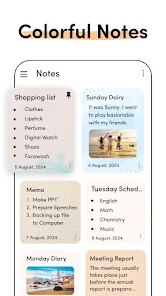
Notes - Notepad, Secure Notes is a versatile note-taking application designed to provide users with a secure and organized platform for capturing thoughts, ideas, and important information. Its core purpose is to function as a reliable digital notebook, offering both simplicity for quick jottings and advanced features for managing sensitive data. The app primarily targets students, professionals, and anyone who needs to keep their notes private and accessible across devices. It solves the common problem of scattered information by centralizing notes in one secure location, protected by encryption.
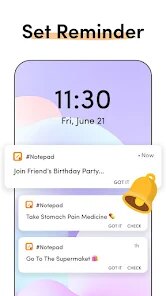
The core functionality of creating, editing, and organizing notes works seamlessly. The interface is intuitive, making it easy to start a new note instantly. Additional features like password protection, fingerprint lock, and cloud backup add significant value, transforming a basic notepad into a personal vault for confidential information. In my experience, the app has been indispensable for managing project ideas and personal reminders. It effectively solved the issue of forgetting passwords and secure codes by providing a locked space that only I can access, replacing the need for insecure physical notebooks or scattered text files.
I would highly recommend this app to users who prioritize privacy and data security in their digital tools. It is most useful for individuals who handle sensitive information, such as freelance writers storing draft ideas, business professionals keeping meeting minutes, or students securing their study notes and research. The app is particularly beneficial in scenarios where you need a quick, secure place to record information without worrying about prying eyes, making it a trustworthy companion for both daily tasks and confidential planning.
features
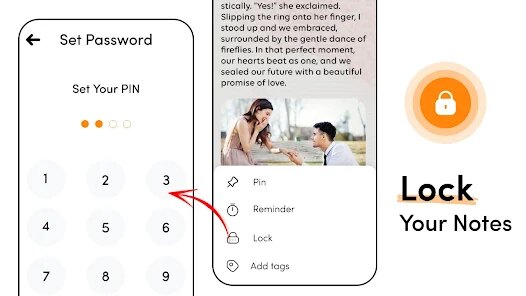
- 🔐 End-to-End Encryption & Biometric Lock: Every note can be secured with a master password or device fingerprint/face ID, ensuring that sensitive information like passwords, financial details, or personal journals remain completely private.
- 📁 Smart Categorization & Search: Organize notes into custom folders and categories. The powerful search function instantly locates any note by its title or content, saving you from scrolling through endless lists.
- ☁️ Cross-Device Sync & Backup: Notes are automatically synced and backed up to your preferred cloud service (like Google Drive), allowing you to access and edit your information seamlessly from your phone, tablet, or computer.
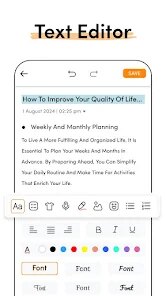
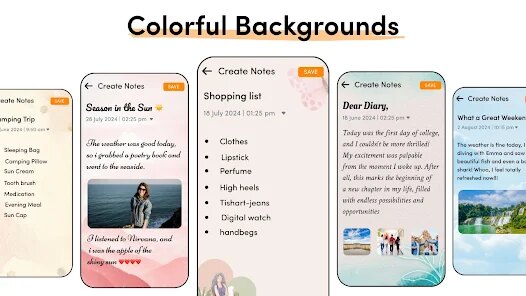
- ✏️ Rich Text Formatting & Media Support: Go beyond plain text with options for bold, italics, lists, and checkboxes. You can also attach images, audio recordings, and files directly to your notes for comprehensive documentation.
pros
- ✅ Robust Security Foundation: The implementation of strong encryption and biometric access provides genuine peace of mind for storing private data, which is the app's standout feature.
- ✅ Clean, User-Friendly Interface: The design is minimalist and distraction-free, making note-taking a smooth and focused experience without unnecessary clutter.
- ✅ Reliable Cloud Integration: The sync and backup process works consistently in the background, effectively preventing data loss and enabling true mobility.
cons
- ⚠️ Limited Free Tier Storage: The free version imposes restrictions on cloud storage capacity or the number of secure notes, which may prompt heavy users to upgrade to a paid plan.
- ⚠️ Basic Organizational Tools: While folders exist, the app lacks more advanced organization methods like tags or nested folders, which can limit management for users with vast note collections.
- ⚠️ Formatting Consistency Across Devices: Occasionally, complex text formatting or media alignment may not appear perfectly identical when viewed on different platforms or screen sizes.
Recommended Apps
![]()
Number Locator - Phone Tracker
Allegany Boys Camp Inc4.6

![]()
Pet To Human - Pet into Human
Applax Pte. Ltd.4.2![]()
Halloween Call: Monster
TeH Software0![]()
Wallpaper 4K, HD – Wallcraft
Nebuchadnezzar DOO4.4![]()
AI Chatbot - Nova
ScaleUp4.7![]()
Photoshop Express Photo Editor
Adobe4.5![]()
Dog Scanner: Breed Recognition
Siwalu Software GmbH4.2![]()
Video Call from Killer Clown -
Dualverse, Inc.3.6![]()
Dola: Smart AI Assistant
SPRING (SG) PTE. LTD.3.9![]()
Girly Lock Screen Wallpaper
Prometheus Interactive LLC3.9![]()
Custom Skin Creator Minecraft
Blakzero4.4![]()
Hiface - Face Shape Detector
Hiface2.5![]()
Period Calendar Period Tracker
Simple Design Ltd.4.9![]()
MagicWidgets: Themepack & Icon
One Office Premium3.3![]()
Love Detector - Fingerprints
KOSHINA APPS0












Hot Apps
-
![]()
PayPal - Send, Shop, Manage
PayPal Mobile4.3 -
![]()
YouTube
Google LLC4.1 -
![]()
letgo: Buy & Sell Used Stuff
letgo3.3 -
![]()
Google Maps
Google LLC4.2 -
![]()
Amazon Fire TV
Amazon Mobile LLC4.1 -
![]()
Snapchat
Snap Inc4.1 -
![]()
Perplexity - Ask Anything
PerplexityAI4.7 -
![]()
ChatGPT
OpenAI4.8 -
![]()
Pinterest
Pinterest4.5 -
![]()
Venmo
PayPal, Inc.4.2 -
![]()
Netflix
Netflix, Inc.3.9 -
![]()
ParkMobile: Park. Pay. Go.
Parkmobile, LLC4.3 -
![]()
Instagram
Instagram3.9 -
![]()
Yuka - Food & cosmetic scan
Yuka App4.7 -
![]()
Ford™
Ford Motor Co.4.7 -
![]()
Grok
xAI4.9 -
![]()
Chai: Chat AI Platform
Chai Research Corp.4.3 -
![]()
Hulu: Stream TV shows & movies
Disney4.5 -
![]()
PolyBuzz: Chat with AI Friends
CLOUD WHALE INTERACTIVE TECHNOLOGY LLC.3.8 -
![]()
Pandora - Music & Podcasts
Pandora4.1 -
![]()
Duolingo: Language & Chess
Duolingo4.7 -
![]()
GasBuddy: Find & Pay for Gas
PDI Software, Inc.3.1 -
![]()
Snapmint: Buy Now, Pay in EMIs
Snapmint4.5 -
![]()
DoorDash - Food Delivery
DoorDash4.6 -
![]()
Sora by OpenAI
OpenAI4.7 -
![]()
Amazon Alexa
Amazon Mobile LLC4.5 -
![]()
Passport Parking
Passport Labs, Inc.2.5 -
![]()
ChatOn - AI Chat Bot Assistant
AIBY Inc.4.4 -
![]()
Uber - Request a ride
Uber Technologies, Inc.4.5 -
![]()
Geeni
Merkury Innovations4.6






























Disclaimer
1.Apkspack does not represent any developer, nor is it the developer of any App or game.
2.Apkspack provide custom reviews of Apps written by our own reviewers, and detailed information of these Apps, such as developer contacts, ratings and screenshots.
3. All trademarks, registered trademarks, product names and company names or logos appearing on the site are the property of their respective owners.
4.Apkspack abides by the federal Digital Millennium Copyright Act (DMCA) by responding to notices of alleged infringement that complies with the DMCA and other applicable laws.
5.If you are the owner or copyright representative and want to delete your information, please contact us [email protected].
6.All the information on this website is strictly observed all the terms and conditions of Google Ads Advertising policies and Google Unwanted Software policy.
7.Apkspack.com is an independent, information-only website which is 100% free to all the users.