GPS Map Camera - Timestamp
Sliver AI Photo Editor
Screenshots


editor reviews
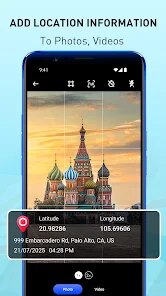
GPS Map Camera is a utility app designed to overlay location data, timestamps, and map information directly onto photos. Its core purpose is to provide visual proof of when and where a picture was taken, making it ideal for professionals and individuals who need to document fieldwork, property inspections, travel logs, or even daily commutes. The app solves the problem of manually adding such details to images, which can be time-consuming and inconsistent when done through traditional editing software.
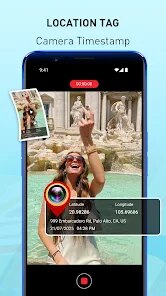
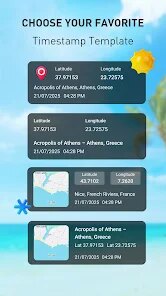
In my experience, the camera interface is straightforward, allowing you to capture a photo or import one from your gallery. The location stamp automatically pulls from your device's GPS, and you can customize the date format, time, and map style. I found this incredibly useful for a recent home renovation project, where I needed to document each stage of the work with precise time and location stamps for the contractor's records. The map embed feature, which shows a small map with a pin, added a layer of clarity that simple text never could. While the app offers a range of overlays and themes, some of the more attractive templates are locked behind a subscription, which is a minor letdown for those who just need basic functionality.
I would recommend GPS Map Camera to field service workers, delivery drivers, real estate agents, and insurance adjusters who require reliable visual documentation. It's also handy for travelers who want to create a detailed photo journal without manual editing. However, if you only need occasional geotagging, the free version might feel limiting.
features
- 📸 Real-time GPS Location & Timestamp Overlay: The app automatically fetches your current location and timestamp, embedding them directly onto the photo. This feature is highly accurate and works seamlessly in both city and rural areas, as long as you have a GPS signal. You can choose from various date and time formats, including 12-hour and 24-hour clocks.
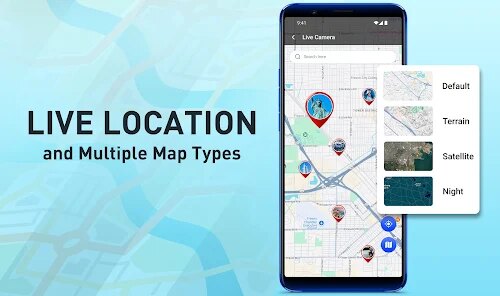
- 📸 Multiple Map Styles & Customization: Beyond just text, you can add a small map snippet showing a pinpoint of your location. There are several map themes, like standard, satellite, and hybrid, which can be resized and repositioned. This is great for giving context, especially when documenting multiple sites.
- 📸 Batch Processing & Batch Add: A significant time-saver is the ability to add timestamps and location stamps to multiple existing photos at once. I used this to add dates to a series of photos from a weekend trip, and it correctly pulled the metadata from each image. This works surprisingly well and maintains image quality.
pros
- 👍 Highly Accurate GPS & Metadata Use: The app relies on the phone's GPS and the photo's metadata, not just manual entry. This ensures the stamps are reliable and trustworthy for professional documentation.
- 👍 Clean, Intuitive Interface: The main screen is uncluttered, with clear options for camera, gallery, and settings. Even a first-time user can quickly understand how to capture or edit a photo.
- 👍 Excellent for Proof of Presence: For anyone needing to prove they were at a specific location at a specific time, this app is a solid, straightforward solution. The map feature adds strong visual validation.
cons
- 👎 Aggressive Subscription Model: Many useful features, like removing the watermark and accessing premium map styles, require a paid subscription. The free version feels limited for regular use.
- 👎 Watermark on Free Version: A small, but persistent, watermark appears on all photos in the free version. While not huge, it can be annoying if you need clean images for reports.
- 👎 Occasional GPS Lag: In areas with poor signal, the GPS can take a few seconds to lock on, causing a slight delay when trying to capture a moment quickly.
Recommended Apps
![]()
Number Locator - Phone Tracker
Allegany Boys Camp Inc4.6

![]()
Pet To Human - Pet into Human
Applax Pte. Ltd.4.2![]()
Halloween Call: Monster
TeH Software0![]()
Wallpaper 4K, HD – Wallcraft
Nebuchadnezzar DOO4.4![]()
AI Chatbot - Nova
ScaleUp4.7![]()
Photoshop Express Photo Editor
Adobe4.5![]()
Dog Scanner: Breed Recognition
Siwalu Software GmbH4.2![]()
Video Call from Killer Clown -
Dualverse, Inc.3.6![]()
Dola: Smart AI Assistant
SPRING (SG) PTE. LTD.3.9![]()
Girly Lock Screen Wallpaper
Prometheus Interactive LLC3.9![]()
Custom Skin Creator Minecraft
Blakzero4.4![]()
Hiface - Face Shape Detector
Hiface2.5![]()
Period Calendar Period Tracker
Simple Design Ltd.4.9![]()
MagicWidgets: Themepack & Icon
One Office Premium3.3![]()
Love Detector - Fingerprints
KOSHINA APPS0















Hot Apps
-
![]()
Blink Home Monitor
Immedia Semiconductor4 -
![]()
ParkMobile: Park. Pay. Go.
Parkmobile, LLC4.3 -
![]()
Venmo
PayPal, Inc.4.2 -
![]()
DoorDash - Food Delivery
DoorDash4.6 -
![]()
Direct Express®
i2c Inc.4.3 -
![]()
Cash App
Block, Inc.4.6 -
![]()
GasBuddy: Find & Pay for Gas
PDI Software, Inc.3.1 -
![]()
Geeni
Merkury Innovations4.6 -
![]()
Affirm: Buy now, pay over time
Affirm, Inc4.7 -
![]()
Telegram
Telegram FZ-LLC4.1 -
![]()
Google Chrome: Fast & Secure
Google LLC4.1 -
![]()
PayByPhone
PayByPhone Technologies Inc .4.9 -
![]()
Ticketmaster-Buy, Sell Tickets
Ticketmaster L.L.C.3 -
![]()
Google Chat
Google LLC4.4 -
![]()
Amazon Fire TV
Amazon Mobile LLC4.1 -
![]()
TikTok
TikTok Pte. Ltd.4.4 -
![]()
PolyBuzz: Chat with AI Friends
CLOUD WHALE INTERACTIVE TECHNOLOGY LLC.3.8 -
![]()
Microsoft Teams
Microsoft Corporation4.6 -
![]()
Bolt: Request a Ride
Bolt Technology4.8 -
![]()
Uber - Request a ride
Uber Technologies, Inc.4.5 -
![]()
Google Pay
Google LLC4.4 -
![]()
Netflix
Netflix, Inc.3.9 -
![]()
YouTube
Google LLC4.1 -
![]()
ChatGPT
OpenAI4.8 -
![]()
Passport Parking
Passport Labs, Inc.2.5 -
![]()
Spotify: Music and Podcasts
Spotify AB4.3 -
![]()
FaceApp: Perfect Face Editor
FaceApp Technology Ltd4.4 -
![]()
Hulu: Stream TV shows & movies
Disney4.5 -
![]()
letgo: Buy & Sell Used Stuff
letgo3.3 -
![]()
Zoom - One Platform to Connect
zoom.us4.1






























Disclaimer
1.Apkspack does not represent any developer, nor is it the developer of any App or game.
2.Apkspack provide custom reviews of Apps written by our own reviewers, and detailed information of these Apps, such as developer contacts, ratings and screenshots.
3. All trademarks, registered trademarks, product names and company names or logos appearing on the site are the property of their respective owners.
4.Apkspack abides by the federal Digital Millennium Copyright Act (DMCA) by responding to notices of alleged infringement that complies with the DMCA and other applicable laws.
5.If you are the owner or copyright representative and want to delete your information, please contact us [email protected].
6.All the information on this website is strictly observed all the terms and conditions of Google Ads Advertising policies and Google Unwanted Software policy.
7.Apkspack.com is an independent, information-only website which is 100% free to all the users.