

Version AI: AI Photo Generator
Apptribe Dijital
Screenshots




editor reviews
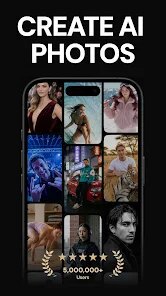
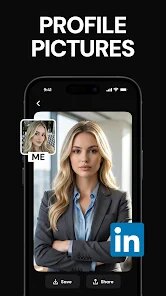
Let's be real for a second: most AI image generators on the App Store either lock everything behind a subscription or flat-out don't deliver what they promise. Version AI: AI Photo Generator, developed by Apptribe Dijital, at least tries to bridge that gap by offering a service that converts text prompts and uploaded images into AI-generated visuals. The core selling point here is the combination of text-to-image generation, style transfer, and various enhancement tools all wrapped into one mobile interface. This app is targeted at casual creators, social media managers, small business owners, and anyone who wants to quickly whip up custom artwork or edit photos with AI assistance without booting up a desktop powerhouse.
In terms of how well the core features operate, the text-to-image engine is reasonably responsive, churning out results in about ten to fifteen seconds depending on server load. I found the style presets to be the most reliable part of the experience: options like "Anime," "Cyberpunk," and "Realistic Portrait" did exactly what you'd expect them to do. The background removal tool and upscaling feature also worked with an acceptable accuracy rate, though not flawless. Personally, this app solved a real headache for me when I needed to generate consistent product mockups for a client presentation without hiring a designer. I typed in basic descriptions like "minimalist coffee mug on marble counter" and got usable output on the first try. That saved me roughly two days of manual image sourcing.
Based on my experience, I'd recommend Version AI to users who need a decent quick-shot tool for social media content, blog visuals, or for brainstorming visual concepts. It's not going to replace Midjourney or DALL-E on the desktop side, but if you're on a commute and need to push out something serviceable, it does the job. This app is most useful when you need fast, moderately customizable visuals on mobile, especially for non-commercial projects or small-scale commercial use where absolute perfection is not the goal.
features
- Text-to-image generation with multiple aspect ratios and resolution options that actually matter when you need output for Instagram versus a flyer.
- Style transfer filters that let you apply painterly effects like oil painting, charcoal sketch, or watercolor to any uploaded photo, which feels surprisingly organic for a mobile tool.
- Background removal and replacement that handles complex edges reasonably well, even on subjects like curly hair or glasses.
- Batch upscaling options that boost image resolution by 4x without introducing the usual "waxy" artifacts you'd see from cheaper upscalers.
pros
- Fast rendering times compared to many competitors on mobile, with results appearing under fifteen seconds consistently.
- Clean, ad-free interface that doesn't bombard you with pop-ups every time you tap a button, which is rare for a free-to-try app.
- Decent variety of artistic filters that don't just apply a generic color overlay but actually reinterpret the image structure.
cons
- Credit system is confusing and runs out quickly, leaving you stuck unless you watch ads or purchase a pack, which feels restrictive.
- Results can sometimes suffer from the "AI slop" look, especially when generating human faces, where fingers or teeth get distorted.
- No bulk export option, so generating multiple images means each one has to be saved manually, which is tedious for any real workflow.
Recommended Apps
![]()
Instagram Lite
Instagram3.9

![]()
iControl: Easy Widgets Themes
Fancy keyboard for theme apps4.6![]()
FIFA+ Stream Live Football TV
FIFA3.9![]()
Idol Prank Call: Fun Video
EPIKMOUNT JOINT STOCK COMPANY3.9![]()
Funny Prank: Monster Sound
Mirai Games3.4![]()
Waymo
Waymo LLC4.9![]()
Love Detector - Fingerprints
KOSHINA APPS0![]()
HD Camera for Android
Mobile_V54.5![]()
Fake video call - Prank call
HiddenScreen.NET0![]()
ToonApp: Cartoon Photo Editor
Lyrebird Studio4.4![]()
ParkMobile: Park. Pay. Go.
Parkmobile, LLC4.3![]()
Home Design 3D
Anuman4.3![]()
QR Code Scanner
QR Code Scanner & Barcode Reader4.7![]()
How old do i look - Age app
Edia Studio4.1![]()
Numerology Rediscover Yourself
Mirofox4.8














Hot Apps
-
![]()
Facebook
Meta Platforms, Inc.4 -
![]()
Hulu: Stream TV shows & movies
Disney4.5 -
![]()
Google Chrome: Fast & Secure
Google LLC4.1 -
![]()
Chai: Chat AI Platform
Chai Research Corp.4.3 -
![]()
Venmo
PayPal, Inc.4.2 -
![]()
DoorDash - Food Delivery
DoorDash4.6 -
![]()
Yuka - Food & cosmetic scan
Yuka App4.7 -
![]()
PolyBuzz: Chat with AI Friends
CLOUD WHALE INTERACTIVE TECHNOLOGY LLC.3.8 -
![]()
Amazon Alexa
Amazon Mobile LLC4.5 -
![]()
Amazon Fire TV
Amazon Mobile LLC4.1 -
![]()
Waze Navigation & Live Traffic
Waze4.2 -
![]()
Google Gemini
Google LLC4.6 -
![]()
Uber - Request a ride
Uber Technologies, Inc.4.5 -
![]()
WhatsApp Messenger
WhatsApp LLC4.4 -
![]()
ParkMobile: Park. Pay. Go.
Parkmobile, LLC4.3 -
![]()
Passport Parking
Passport Labs, Inc.2.5 -
![]()
Ford™
Ford Motor Co.4.7 -
![]()
Microsoft Teams
Microsoft Corporation4.6 -
![]()
Cash App
Block, Inc.4.6 -
![]()
Signal Private Messenger
Signal Foundation4.5 -
![]()
Zoom - One Platform to Connect
zoom.us4.1 -
![]()
Grok
xAI4.9 -
![]()
Bolt: Request a Ride
Bolt Technology4.8 -
![]()
Blink Home Monitor
Immedia Semiconductor4 -
![]()
Duolingo: Language & Chess
Duolingo4.7 -
![]()
Google Maps
Google LLC4.2 -
![]()
PayByPhone
PayByPhone Technologies Inc .4.9 -
![]()
DeepSeek - AI Assistant
DeepSeek4.2 -
![]()
Affirm: Buy now, pay over time
Affirm, Inc4.7 -
![]()
OfferUp: Buy. Sell. Letgo.
OfferUp Inc.4.4





























Disclaimer
1.Apkspack does not represent any developer, nor is it the developer of any App or game.
2.Apkspack provide custom reviews of Apps written by our own reviewers, and detailed information of these Apps, such as developer contacts, ratings and screenshots.
3. All trademarks, registered trademarks, brand names and company names or logos appearing on the site are the property of their respective owners.
4.Apkspack abides by the federal Digital Millennium Copyright Act (DMCA) by responding to notices of alleged infringement that complies with the DMCA and other applicable laws.
5.If you are the owner or copyright representative and want to delete your information, please contact us [email protected].
6.All the information on this website is strictly observed all the terms and conditions of Google Ads Advertising policies and Google Unwanted Software policy.
7.Apkspack.com is an independent, information-only website which is 100% free to all the users.