

Volume Control Sound Launcher
AtomApplications
Screenshots
editor reviews
Volume Control Sound Launcher is a utility app designed to provide quick access to system volume controls and device sound settings from a single, convenient interface. Instead of digging through multiple menus or hunting for physical buttons on your device, this app bundles all audio-related adjustments into one streamlined tool. It's built for anyone who regularly adjusts their phone's volume, toggles between sound profiles, or needs quick access to their device's audio settings throughout the day.
The app tackles a surprisingly common frustration: the unnecessary steps required to change basic audio settings on modern smartphones. With many devices hiding physical buttons or burying volume controls deep in settings menus, this app serves as a shortcut that saves both time and finger taps. In my day-to-day use, I found it particularly helpful when switching between my home speaker setup and work headphones. The app let me quickly reset volume levels without accidentally triggering media playback or receiving calls with blasting audio. It solved the specific headache of fumbling with hardware buttons in my pocket or bag before important calls.
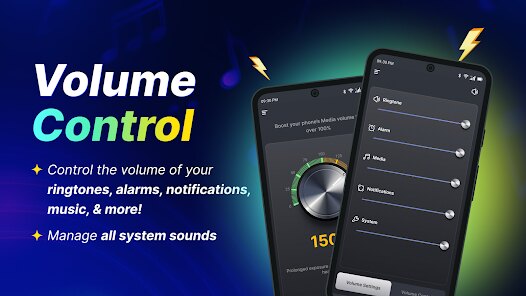
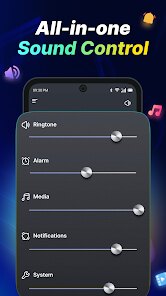
The core functions work reliably, offering smooth sliders for ringtone, media, alarm, and notification volumes. Some additional features include preset sound profiles you can activate with a single tap, making the transition between quiet office mode and loud commute listening effortless. I would recommend this app to anyone who juggles multiple audio devices, frequently switches between silent and loud environments, or simply wants to avoid the hassle of navigating their phone's complex settings just to lower the volume before walking into a meeting. It's most useful for people who value speed and convenience in their daily phone interactions.
features
- 🔊 One-tap sound profile switching lets you instantly toggle between Silent, Vibrate, Normal, and custom volume presets. This makes moving between different environments effortless, without needing to manually slide each volume bar individually.
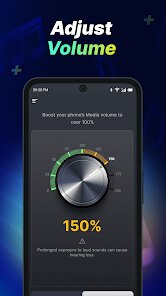
- 🔊 Independent volume sliders for media, ringtone, alarm, notifications, and system sounds give you precise control. Unlike your phone's default setup, this app shows all volume types on one screen so you never accidentally blast music when you meant to adjust the ringer.
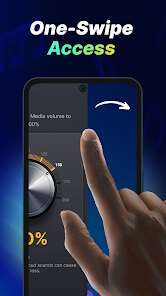
- 🔊 The Quick Settings tile integration puts the app's controls in your notification shade. You can access all volume adjustments without even opening the app itself, shaving seconds off each interaction that add up throughout the day.
- 🔊 Scheduled profile switching automates volume changes based on time or calendar events. Set it to mute your phone during meetings or lower media volume at bedtime, eliminating the need to remember manual adjustments.
pros
- ✅ The clean, uncluttered interface presents all controls in a logical layout. You never need to hunt for a specific slider because everything sits exactly where you expect it.
- ✅ Zero learning curve. The app mirrors familiar volume controls while adding convenience, so anyone can use it immediately without reading instructions or tutorials.
- ✅ Minimal battery and resource impact. The app stays lightweight and doesn't run heavy background processes, preserving your device's performance and battery life.
cons
- ❌ The app lacks customization for slider appearance or color themes. Users who want a personalized look beyond basic functionality may find the design too plain.
- ❌ Some users report occasional delayed response when toggling between presets, especially on older or lower-end devices. The delay breaks the instant-access promise.
- ❌ No backup or sync feature exists for your saved profiles. Losing your phone or resetting it means manually recreating all your carefully configured sound settings.
Recommended Apps
![]()
Number Locator - Phone Tracker
Allegany Boys Camp Inc4.6

![]()
Pet To Human - Pet into Human
Applax Pte. Ltd.4.2![]()
Halloween Call: Monster
TeH Software0![]()
Wallpaper 4K, HD – Wallcraft
Nebuchadnezzar DOO4.4![]()
AI Chatbot - Nova
ScaleUp4.7![]()
Photoshop Express Photo Editor
Adobe4.5![]()
Dog Scanner: Breed Recognition
Siwalu Software GmbH4.2![]()
Video Call from Killer Clown -
Dualverse, Inc.3.6![]()
Dola: Smart AI Assistant
SPRING (SG) PTE. LTD.3.9![]()
Girly Lock Screen Wallpaper
Prometheus Interactive LLC3.9![]()
Custom Skin Creator Minecraft
Blakzero4.4![]()
Hiface - Face Shape Detector
Hiface2.5![]()
Period Calendar Period Tracker
Simple Design Ltd.4.9![]()
MagicWidgets: Themepack & Icon
One Office Premium3.3![]()
Love Detector - Fingerprints
KOSHINA APPS0















Hot Apps
-
![]()
Chai: Chat AI Platform
Chai Research Corp.4.3 -
![]()
Uber - Request a ride
Uber Technologies, Inc.4.5 -
![]()
Amazon Fire TV
Amazon Mobile LLC4.1 -
![]()
GroupMe
GroupMe4.5 -
![]()
Yuka - Food & cosmetic scan
Yuka App4.7 -
![]()
TikTok
TikTok Pte. Ltd.4.4 -
![]()
Blink Home Monitor
Immedia Semiconductor4 -
![]()
Netflix
Netflix, Inc.3.9 -
![]()
Hulu: Stream TV shows & movies
Disney4.5 -
![]()
Facebook
Meta Platforms, Inc.4 -
![]()
DeepSeek - AI Assistant
DeepSeek4.2 -
![]()
ChatGPT
OpenAI4.8 -
![]()
FaceApp: Perfect Face Editor
FaceApp Technology Ltd4.4 -
![]()
PayByPhone
PayByPhone Technologies Inc .4.9 -
![]()
PolyBuzz: Chat with AI Friends
CLOUD WHALE INTERACTIVE TECHNOLOGY LLC.3.8 -
![]()
OfferUp: Buy. Sell. Letgo.
OfferUp Inc.4.4 -
![]()
Google Gemini
Google LLC4.6 -
![]()
Google Home
Google LLC4.2 -
![]()
Klarna | Shop now. Pay later.
Klarna Bank AB (publ)4.3 -
![]()
Bolt: Request a Ride
Bolt Technology4.8 -
![]()
Pandora - Music & Podcasts
Pandora4.1 -
![]()
ParkMobile: Park. Pay. Go.
Parkmobile, LLC4.3 -
![]()
Afterpay - Buy Now Pay Later
Afterpay3.8 -
![]()
Google Chrome: Fast & Secure
Google LLC4.1 -
![]()
Passport Parking
Passport Labs, Inc.2.5 -
![]()
Affirm: Buy now, pay over time
Affirm, Inc4.7 -
![]()
Waze Navigation & Live Traffic
Waze4.2 -
![]()
Snapmint: Buy Now, Pay in EMIs
Snapmint4.5 -
![]()
Wise: International Transfers
Wise Payments Ltd.4.7 -
![]()
Ford™
Ford Motor Co.4.7






























Disclaimer
1.Apkspack does not represent any developer, nor is it the developer of any App or game.
2.Apkspack provide custom reviews of Apps written by our own reviewers, and detailed information of these Apps, such as developer contacts, ratings and screenshots.
3. All trademarks, registered trademarks, product names and company names or logos appearing on the site are the property of their respective owners.
4.Apkspack abides by the federal Digital Millennium Copyright Act (DMCA) by responding to notices of alleged infringement that complies with the DMCA and other applicable laws.
5.If you are the owner or copyright representative and want to delete your information, please contact us [email protected].
6.All the information on this website is strictly observed all the terms and conditions of Google Ads Advertising policies and Google Unwanted Software policy.
7.Apkspack.com is an independent, information-only website which is 100% free to all the users.